Best AI Tool to Make Money in 2026:
Introduction:
Can an AI Tool Really Help You Make Money?
Let’s be honest for a second. If you’ve searched for “best AI tool to make money,” you’ve probably already scrolled past ten articles promising you’ll quit your job in 30 days.
That’s not what this is.
AI tools genuinely can help you earn extra income in 2026. Writers use them to work faster. Small business owners use them to cut down on hired help. Freelancers use them to take on more clients without burning out. But an AI tool doesn’t hand you money. It saves you time, and time is what you turn into money.
This guide walks through the AI tools that people are actually using to earn income right now, what they’re good at, what they’re not, and who should (and shouldn’t) bother with them.
1. What “Making Money With AI” Actually Means

Before picking a tool, it helps to be clear on what you’re actually doing. Most people who make money with AI fall into one of these buckets:
- Freelancing faster — writing, editing, or designing for clients using AI as a first draft machine
- Selling digital products — templates, ebooks, printables, or stock images made with AI help
- Running a small content business — blogs, YouTube channels, or social pages where AI speeds up production
- Automating parts of a business — customer replies, product descriptions, basic bookkeeping
Notice none of these are “AI does the work and money appears.” Every single one still needs a human directing it, checking it, and putting it in front of real customers.
2. The Best AI Tools for Making Money (Comparison Table)
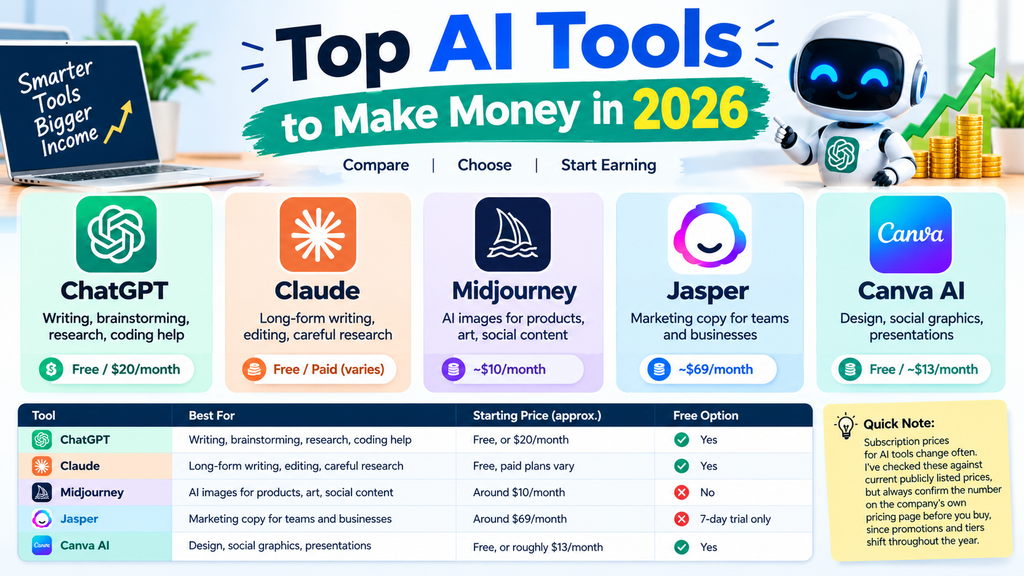
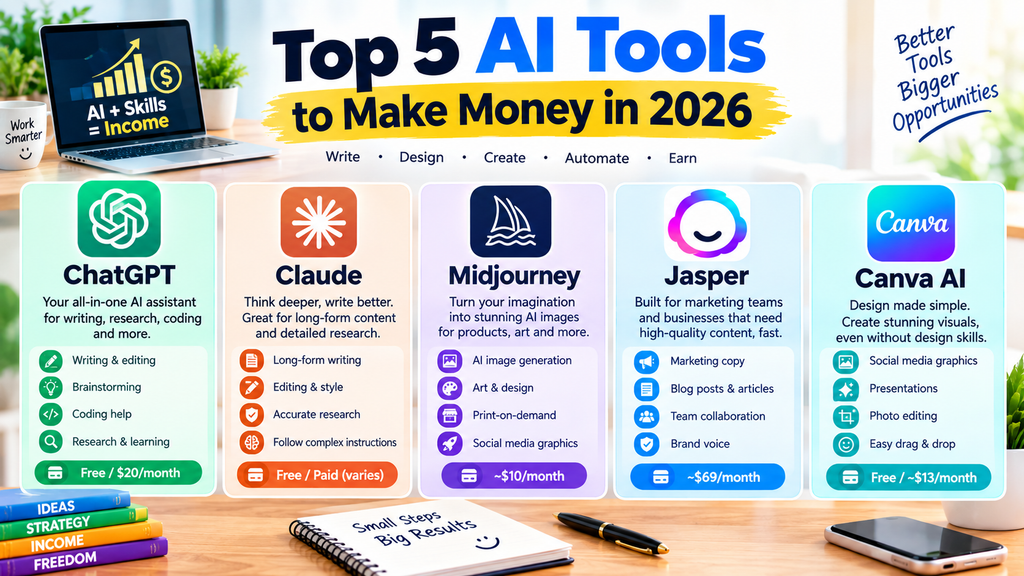
| Tool | Best For | Starting Price (approx.) | Free Option |
|---|---|---|---|
| ChatGPT | Writing, brainstorming, research, coding help | Free, or $20/month for Plus | Yes |
| Claude | Long-form writing, editing, careful research | Free, paid plans vary | Yes |
| Midjourney | AI images for products, art, social content | Around $10/month for basic plans | No |
| Jasper | Marketing copy for teams and businesses | Around $69/month | 7-day trial only |
| Canva AI (Magic Studio) | Design, social graphics, presentations | Free, or roughly $13/month for Pro | Yes |
A quick note here: subscription prices for AI tools change often. I’ve checked these against current publicly listed prices, but always confirm the number on the company’s own pricing page before you buy, since promotions and tiers shift throughout the year.
3. ChatGPT: The All-Rounder
ChatGPT, made by OpenAI, is probably the tool most people think of first. And for good reason — it’s flexible enough to help with almost any money-making side hustle.
I’ve used it myself to draft outlines for client blog posts, brainstorm product names, and even debug small pieces of code for a friend’s Etsy shop website. It’s not perfect at any one thing, but it’s decent at almost everything.
What It’s Good At
- Writing first drafts of articles, emails, and product descriptions
- Brainstorming business names, niches, and content ideas
- Basic coding help for small automation projects
- Explaining unfamiliar topics quickly, which is handy for freelance writers taking on new subjects
Where It Falls Short
- Free tier has usage limits and older model access
- Can sound generic if you don’t edit its output
- Sometimes gets facts wrong, so anything client-facing needs a fact-check
4. Claude: The Careful Writer’s Choice
Claude, made by Anthropic, tends to get less attention in “make money” roundups, but freelance writers and editors often prefer it for longer, more nuanced writing tasks.
In my own testing, Claude tends to hold onto instructions better across a long editing session — useful if you’re working through a 3,000-word client draft and don’t want to repeat yourself every few messages.
What It’s Good At
- Long documents, reports, and detailed editing
- Following specific style guides or tone instructions
- Research summaries where accuracy matters
Where It Falls Short
- Image generation isn’t part of the core product
- Newer users may find the free tier’s message limits restrictive during busy work sessions
5. Midjourney: Turning Images Into Income
If your money-making plan involves visuals — think print-on-demand shirts, stock photography, or social media graphics — Midjourney is one of the more established names for AI image generation.
A friend of mine who sells printable wall art on Etsy switched to using AI-generated base images last year, then edits and upscales them in a regular photo editor before listing them. It cut her production time from a full day per design down to a couple of hours.
What It’s Good At
- Producing polished, stylized images fast
- Good for print-on-demand, digital art, and mockups
- Strong community and prompt-sharing culture, which shortens the learning curve
Where It Falls Short
- No free tier currently
- Runs through Discord, which has a learning curve for beginners
- Copyright and marketplace rules around AI art vary by platform, so always check the terms of the site where you plan to sell
6. Jasper: Built for Marketing Teams
Jasper markets itself less as a general chatbot and more as a business writing tool, aimed at marketing teams and agencies producing content at scale.
If you’re a solo freelancer, Jasper is probably overkill and pricier than you need. But if you’re running a small agency writing blog posts and ad copy for multiple clients, the brand voice and workflow features can genuinely save hours each week.
What It’s Good At
- Keeping a consistent brand voice across many pieces of content
- Templates built specifically for marketing copy
- Team collaboration features
Where It Falls Short
- No permanent free plan, only a short trial
- Priced higher than general-purpose tools like ChatGPT or Claude
- Overkill for someone just starting a side hustle
7. Canva AI: Design Without a Design Degree
Canva’s AI features, bundled under what it calls Magic Studio, are aimed at people who need to design things but never learned design software.
This is the tool I’d point a total beginner toward if their money-making idea involves social media graphics, presentations, or simple product mockups. It’s approachable in a way most AI writing tools aren’t.
What It’s Good At
- Quick social media graphics and presentation slides
- Background removal and simple photo editing
- Beginner-friendly interface with drag-and-drop design
Where It Falls Short
- Advanced design control is limited compared to professional software
- AI writing features inside Canva are less capable than dedicated chatbots
Pros and Cons of Using AI Tools to Make Money
Pros
- Saves real time on repetitive tasks like drafting, editing, and designing
- Lowers the skill barrier for things like writing or graphic design
- Many tools have usable free tiers to test before paying
- Can help a single freelancer take on more clients
Cons
- Doesn’t replace the need for a real audience, client base, or market
- Output usually needs human review, especially for facts and tone
- Subscription costs add up if you use multiple tools
- Competition is rising since more people are using the same tools
8. Real-World Use Cases
The freelance writer. A writer I know takes on more client blog posts per month by using ChatGPT for first drafts, then spending her actual writing time on editing, fact-checking, and adding her own voice. She’s not writing faster from scratch — she’s editing faster.
The Etsy seller. As mentioned earlier, print-on-demand and digital art sellers use Midjourney or similar tools to generate base designs, then refine them before listing. The income still depends on good product photography, SEO on the Etsy listing, and pricing — the AI tool is one part of the pipeline, not the whole thing.
The small agency. A two-person marketing agency uses Jasper to keep multiple client blogs on-brand without hiring a third writer. The tool didn’t create new clients for them; it let them serve existing clients without expanding headcount.
The side-hustle content creator. Someone running a niche YouTube channel on a topic like budgeting tips might use Canva AI for thumbnails and ChatGPT or Claude for script outlines, cutting production time enough to post more consistently, which in turn helps grow ad revenue over time.
9. Pricing Snapshot
Pricing on AI tools shifts often, so treat these as a general guide rather than a guarantee.
- ChatGPT: Free tier available; Plus plan around $20/month, with higher-tier plans for heavier use
- Claude: Free tier available; paid plans exist for higher usage and more advanced models
- Midjourney: No free tier currently; basic plans start around $10/month
- Jasper: No permanent free plan; Pro plan runs roughly $59–$69/month depending on billing cycle
- Canva: Free tier available; Pro plan runs roughly $13/month for individuals
Always check the official pricing page before subscribing, since companies adjust tiers and promotions throughout the year.
10. Who Should Use Which Tool?
- New to AI and just want to try something free: Start with ChatGPT’s free tier or Claude’s free tier
- Freelance writer or editor: Claude for longer documents, ChatGPT for quick brainstorming
- Selling AI-made visuals or products: Midjourney, paired with a regular photo editor
- Running a content or marketing agency: Jasper, once you have paying clients to justify the cost
- Complete design beginner: Canva AI, for its simplicity and free tier
11. My Honest Verdict
There’s no single “best” AI tool for making money, and I’d be lying if I picked just one and called it done. It depends entirely on what you’re actually trying to sell — words, images, designs, or time saved.
If I had to recommend a starting point for someone with no clear direction yet, I’d say start with ChatGPT or Claude’s free tiers. They’re general enough to help you figure out what kind of side hustle even fits your skills, without spending a dime first.
What I wouldn’t do is buy three or four subscriptions before making a single dollar. AI tools are a means to an end. The actual money-making part — finding clients, building an audience, listing products — still takes real effort that no chatbot does for you.
12. Frequently Asked Questions
1. Can I really make money using AI tools? Yes, but indirectly. AI tools speed up tasks like writing, designing, and researching. The income still comes from selling a service or product to real people.
2. Which AI tool is best for beginners? ChatGPT and Canva AI both have gentle learning curves and free tiers, making them solid starting points.
3. Do I need to pay for these tools to make money? Not necessarily. Many people start earning using only free tiers, then upgrade once income justifies the cost.
4. Is AI-generated content safe to sell? It depends on the platform. Some marketplaces have rules about disclosing AI involvement. Always check the terms of service where you plan to sell.
5. How much money can I realistically make with AI tools? This varies enormously and depends on your skills, market, and effort. There’s no reliable average figure, and anyone promising guaranteed income numbers should be treated with caution.
6. Can AI tools replace freelance writers or designers? Not entirely. They speed up drafts and rough designs, but human judgment, editing, and client relationships still matter a great deal.
7. Which is better for writing: ChatGPT or Claude? Both are strong. ChatGPT tends to be faster for quick brainstorming, while Claude often handles longer, more detailed writing tasks well. Trying both free tiers is the easiest way to see which fits your workflow.
13. Conclusion
AI tools aren’t magic income machines, but they are genuinely useful time-savers for anyone willing to put in the work around them. Whether that’s writing, designing, or running a small content business, the right tool can help you do more with the hours you already have.
Start small, try the free tiers first, and only pay for a subscription once you can see exactly how it’s saving you time or helping you earn. That’s the honest path — not the overnight one.
Read Also
OpenAI GPT-5.6 Launch: Everything You Need to Know
Top 12 AI Tools Every Student Needs in 2026 (Free & Paid, Fully Tested)

Hey, I’m Manish
I’ve tested 100+ AI tools since 2023 and reviewed them honestly on ZentroAI.
My mission: Help you discover the best AI tools without the hype.
Whether you need ChatGPT alternatives, coding assistants, or image generators .
you’ll find detailed, hands-on reviews here.