ChatGPT vs. Claude vs. Gemini
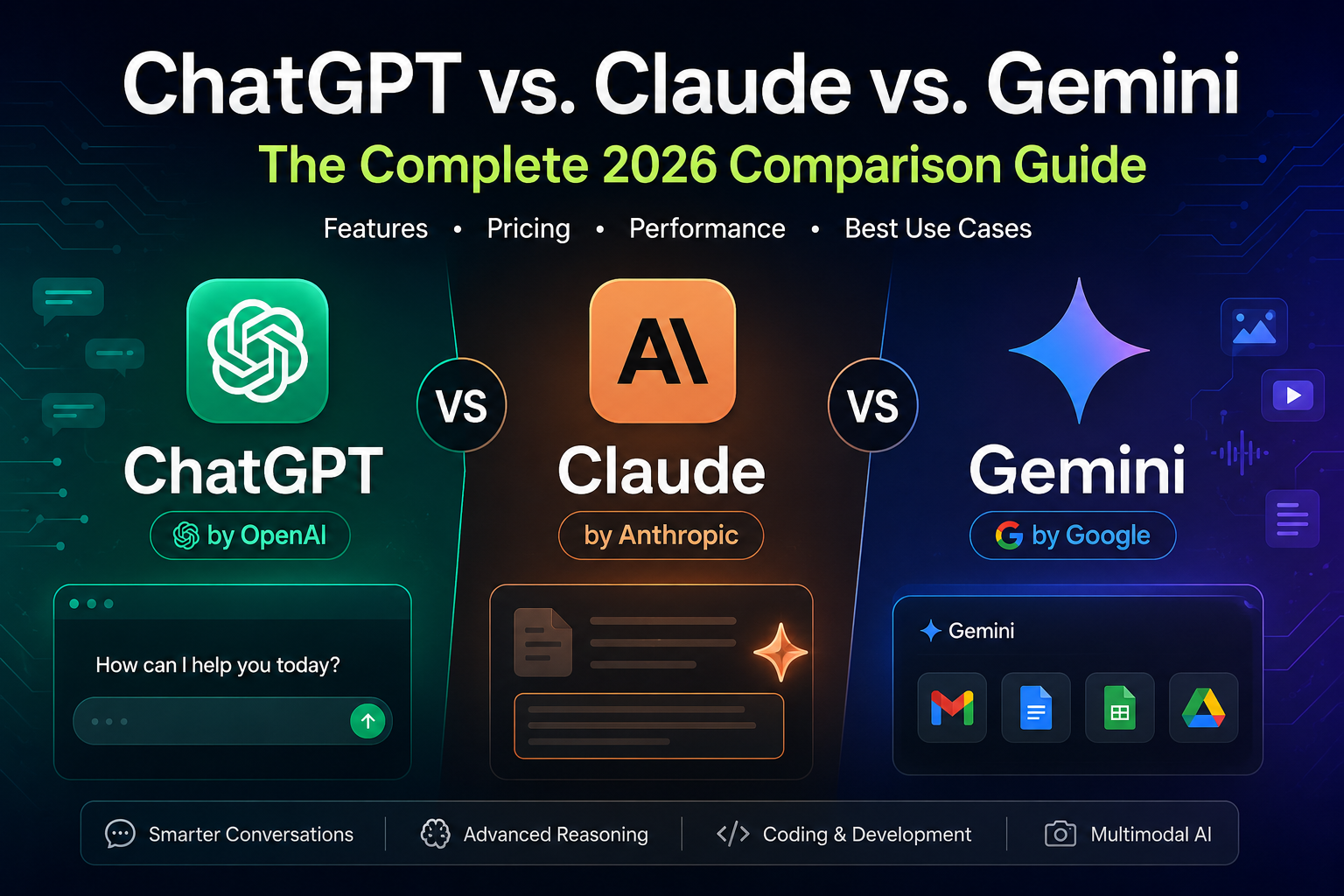
If you’ve typed “best AI chatbot” into Google in the last few months, you already know the problem: there isn’t one simple answer anymore. ChatGPT, Claude, and Gemini have all grown into genuinely different tools with different personalities, strengths, and blind spots. Picking the “best” one really depends on what you’re trying to do with it — write a novel, debug a Python script, plan a research paper, or just get a fast answer to a random question at 11 p.m.
This guide breaks down all three assistants in plain English, based on how they actually perform in 2026, not how they were two years ago. We’ll walk through pricing, writing quality, coding ability, reasoning, safety, and everyday usability, then wrap up with a side-by-side table and answers to the questions people ask most.
A Quick Snapshot of Where Each Company Stands in 2026
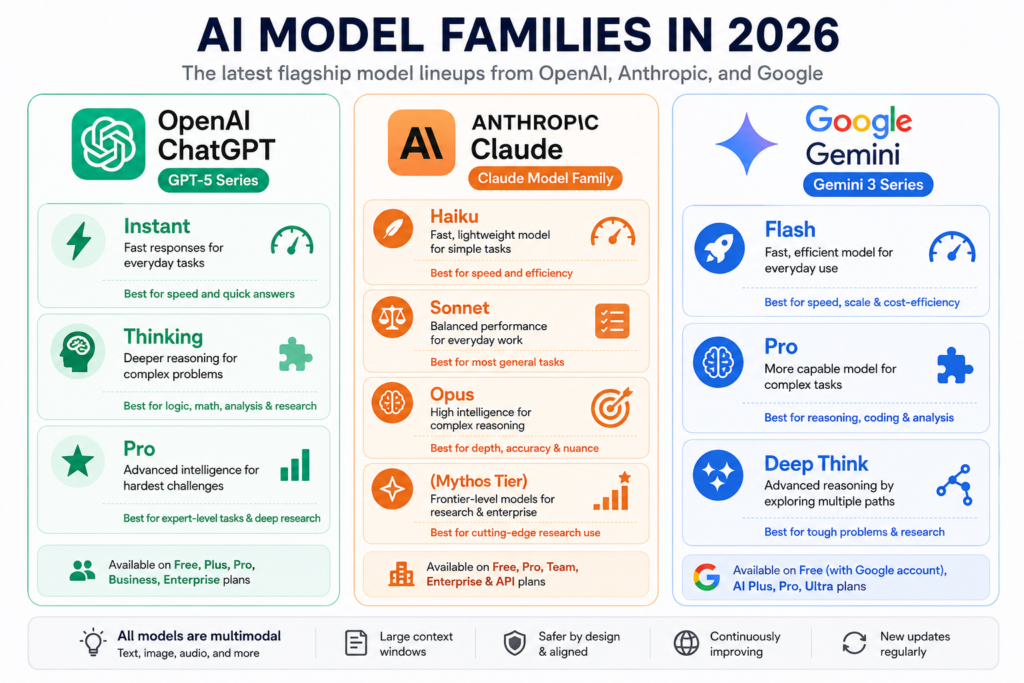
Before diving into the details, it helps to know what’s actually running under the hood right now.
OpenAI’s ChatGPT has moved to a unified GPT-5 family. Instead of picking between a dozen confusingly named models, ChatGPT now auto-routes your question between a fast “Instant” mode and a slower, more thorough “Thinking” mode, with a “Pro” tier for the hardest research-grade tasks. Free users get the Instant model by default, while paid plans unlock deeper reasoning and higher usage limits.
Anthropic’s Claude has expanded into a tiered lineup as well: Claude Haiku for speed, Claude Sonnet for a strong everyday balance of intelligence and cost, and Claude Opus for the deepest reasoning. Above Opus, Anthropic has introduced a new “Mythos” tier for frontier research use, though that’s mostly relevant to enterprises and developers rather than everyday users.
Google’s Gemini has leaned hard into its Gemini 3 family, with Gemini 3 Pro handling complex reasoning and multimodal tasks, and lighter “Flash” variants built for speed and cost efficiency. Gemini’s biggest advantage continues to be how deeply it’s woven into everyday Google products — Search, Gmail, Docs, Sheets, and Android.
None of these companies are standing still, and version numbers change every few weeks. But the underlying character of each assistant — how it “feels” to use — has stayed fairly consistent, and that’s what we’ll focus on here.
Writing and Everyday Conversation
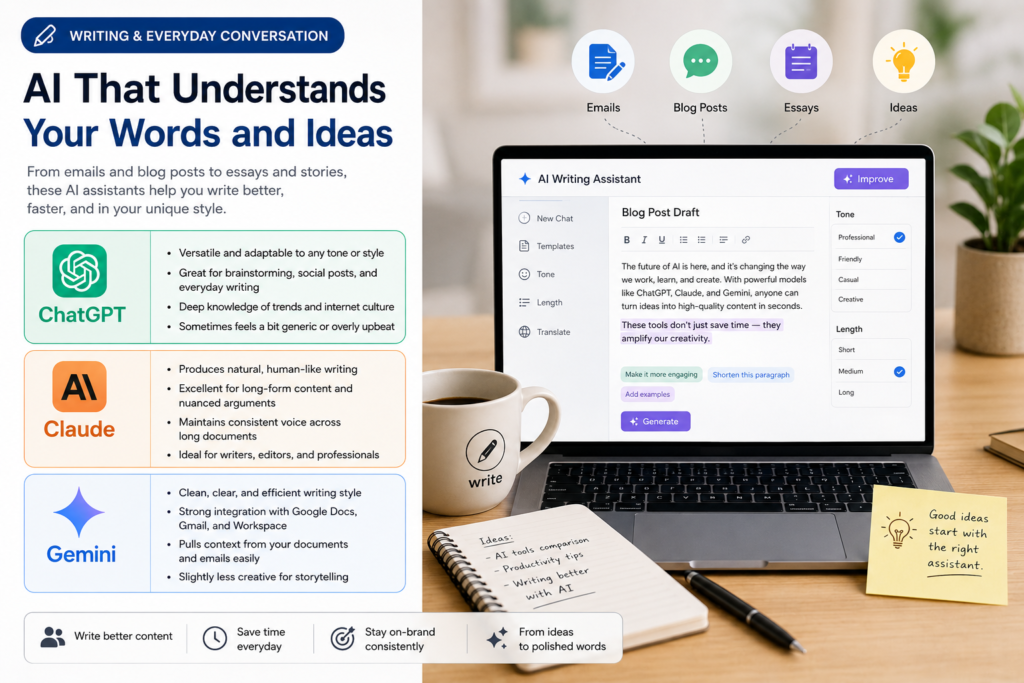
If you use AI mostly for writing — emails, blog posts, social captions, or just brainstorming — this is where the personality differences show up the most.
ChatGPT tends to be the most versatile all-rounder. It can shift tone quickly, follow specific style instructions well, and has a huge amount of built-in knowledge about pop culture, trends, and internet-speak, which makes it good for casual or marketing-style writing. Its downside is that it can sometimes sound a little generic or overly enthusiastic unless you specifically ask it to tone things down.
Claude has built a reputation among writers and editors for producing text that reads more naturally, with fewer of the repetitive phrasing patterns and clichés that other models fall into. It’s especially good at long-form writing, nuanced arguments, and maintaining a consistent voice across a long document. Many professional writers and editors specifically choose Claude when the output needs to sound like it was written by a thoughtful human rather than an algorithm.
Gemini is solid for everyday writing tasks and has an edge when your work already lives inside Google Docs or Gmail, since it can pull context directly from those apps. Its writing style is clean and fairly neutral, though some users find it less creative than Claude or ChatGPT for open-ended storytelling.
Coding and Technical Work
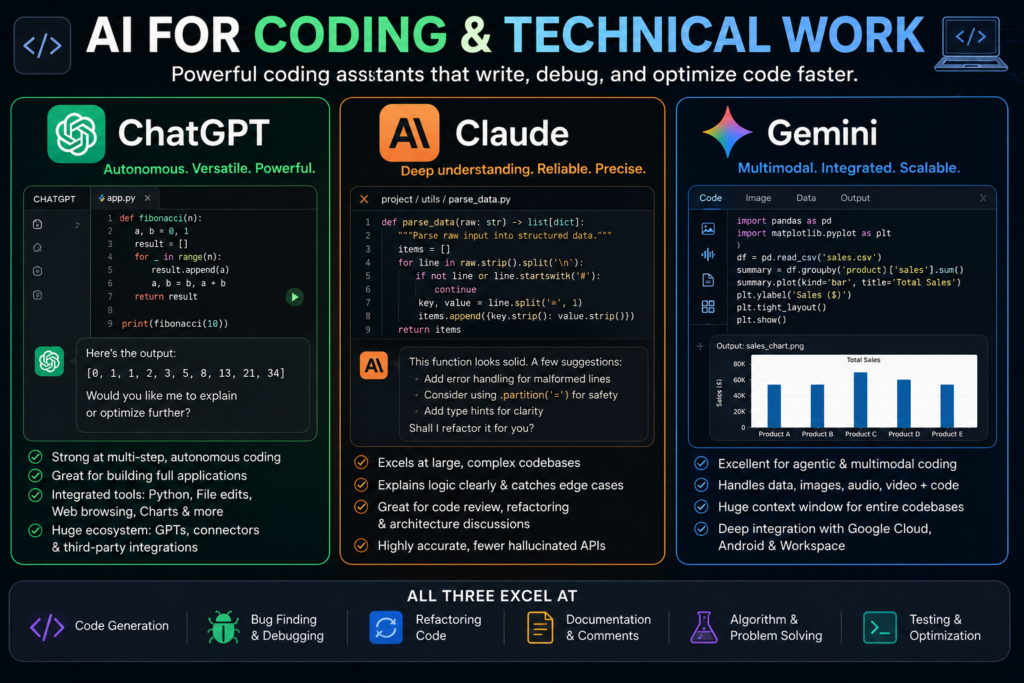
This is one of the most competitive categories, and honestly, all three have become genuinely strong coding assistants.
ChatGPT’s coding-focused variant has been trained specifically to handle multi-step, autonomous coding work — writing, testing, and debugging code with less back-and-forth. It integrates well with developer tools and remote coding workflows, which makes it a favorite for people building full applications rather than just snippets.
Claude has consistently topped independent coding benchmarks for real-world software engineering tasks, and many developers describe it as the model that “just gets it” when working through a large, messy codebase. It tends to explain its reasoning clearly, catch edge cases, and avoid confidently inventing functions or libraries that don’t exist — a common frustration with AI-generated code.
Gemini’s latest models perform extremely well on agentic coding benchmarks too, particularly for tasks that mix code with other data types — like reading a spreadsheet, writing a script to analyze it, and generating a chart. Its massive context window also means it can work with entire codebases or lengthy documentation in a single conversation without losing track of earlier details.
If you’re a solo developer working on smaller projects, any of the three will likely serve you well. For very large codebases or long, complex debugging sessions, Claude and Gemini’s larger context windows tend to hold up better over time.
Reasoning and Problem-Solving
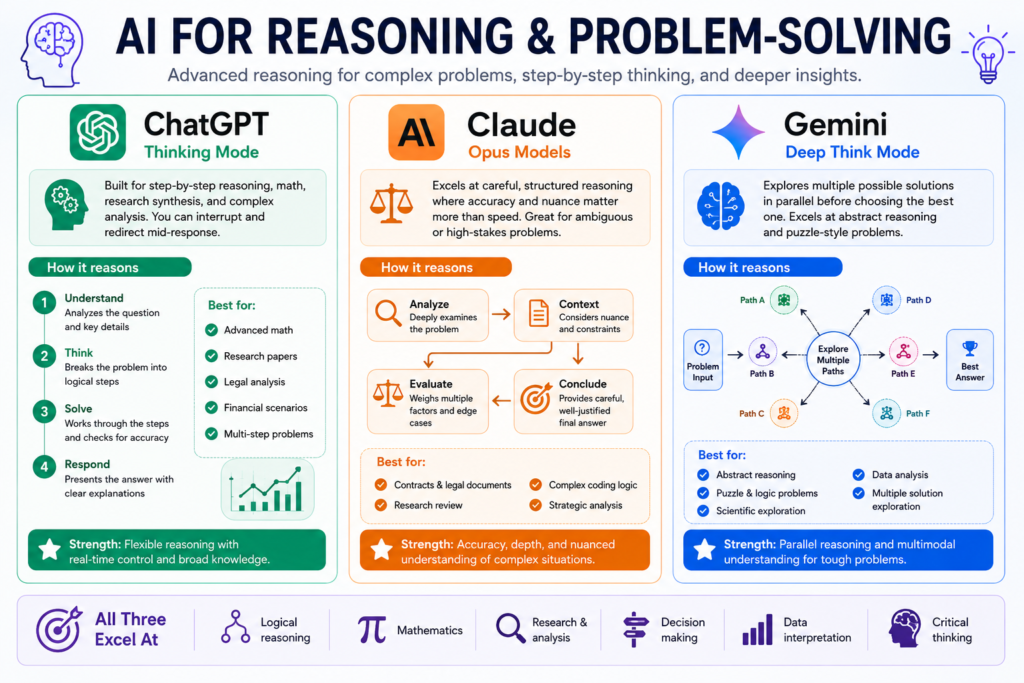
Reasoning ability — how well a model handles multi-step logic, math, and complex analysis — has become the main battleground between these companies.
ChatGPT’s “Thinking” mode is built specifically for problems that need step-by-step reasoning, like advanced math, research synthesis, or working through legal or financial scenarios. It also lets you interrupt and redirect it mid-response, which is a genuinely useful feature when you realize halfway through that it’s heading in the wrong direction.
Claude’s Opus-tier models are widely regarded as some of the strongest for careful, structured reasoning, especially in situations where accuracy matters more than speed — analyzing contracts, reviewing research, or working through ambiguous problems where jumping to a fast answer would be a mistake.
Gemini’s Deep Think mode, available to higher-tier subscribers, explores multiple possible solutions in parallel before settling on an answer, which has pushed its scores up significantly on abstract reasoning and puzzle-style benchmarks. It’s particularly strong when a problem benefits from exploring several different approaches before picking one.
For most everyday users, the difference in raw reasoning power is smaller than the marketing suggests. Where it really matters is in professional or academic settings — data analysis, scientific research, or complex financial modeling — where even small reasoning errors can be costly.
Multimodal Abilities: Images, Audio, and Video
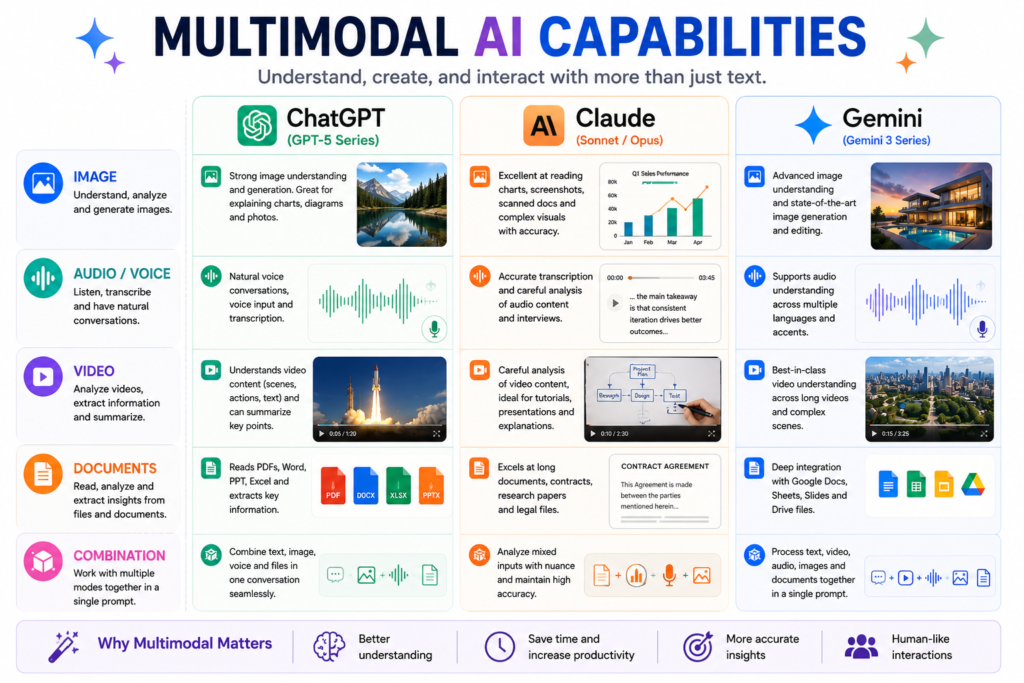
All three platforms can now handle more than just text, but they each have a different sweet spot.
ChatGPT has strong image understanding and generation, along with voice features that feel natural in real-time conversation. Its interactive learning tools, which let you manipulate graphs and formulas live, are a nice touch for students.
Claude has focused more on document and image understanding — reading PDFs, screenshots, charts, and scanned documents accurately — rather than flashy generation features. If your work involves interpreting existing visual content, like a contract scan or a chart from a report, Claude tends to handle it carefully and explain what it sees clearly.
Gemini is arguably the strongest all-around multimodal model right now. It can process video, audio, images, and documents together in a single prompt, and Google’s image generation tools (often referred to informally as the “Nano Banana” models) have become genuinely impressive for producing and editing images from natural language descriptions.
Context Window and Memory
A “context window” is essentially how much information a model can hold in its head at once during a conversation — the length of a document it can read, or how much of your chat history it can remember while responding.
Both Gemini and Claude currently offer very large context windows, often reaching up to a million tokens on their higher-tier models, which is roughly equivalent to several long novels. This makes them well-suited for reviewing lengthy legal documents, large codebases, or lengthy research papers in one go.
ChatGPT’s context window has also grown substantially and now handles long documents comfortably for most everyday and professional use cases, though its standout feature is persistent memory — the ability to remember details about you across separate conversations, like your writing preferences or ongoing projects, without you having to repeat yourself.
Pricing and Plans
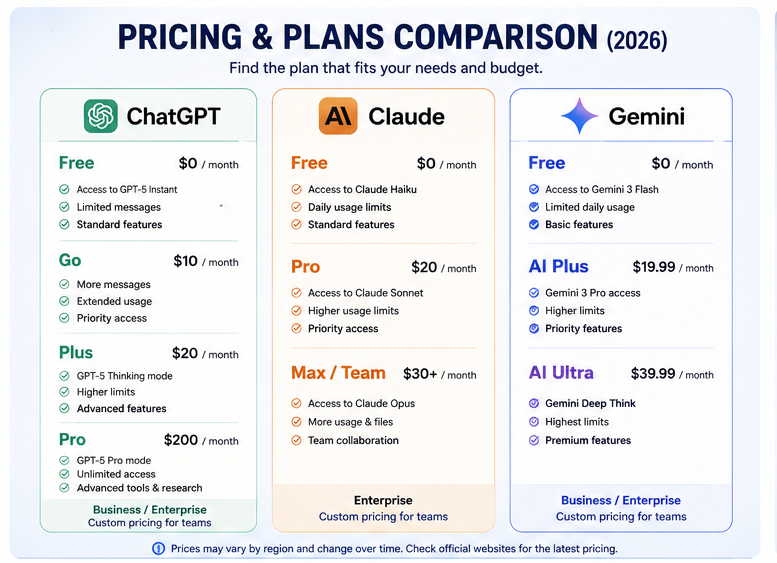
Pricing has become more layered across all three services, but here’s the general shape of things:
ChatGPT offers a free tier with access to its everyday model, a mid-tier “Go” plan for people who need more usage without paying for a full professional subscription, and a Plus plan that unlocks its more powerful reasoning modes. Business, Enterprise, and Pro tiers exist for heavier or organizational use.
Claude offers a free tier with solid daily usage, along with paid plans that unlock its more capable Sonnet and Opus models, higher usage limits, and access to features like extended file uploads and project organization tools.
Gemini’s free tier is generous partly because it’s bundled with a regular Google account, and its paid tiers (Google AI Plus, Pro, and Ultra) scale up usage limits and unlock its most advanced reasoning modes, along with deeper integration across Google Workspace apps.
If you’re already paying for Google Workspace or an Android device, Gemini often ends up being the most cost-effective option simply because so much of it is already bundled in. If you want the single most capable model regardless of ecosystem, it’s worth comparing the top-tier plans of all three directly, since pricing shifts fairly often.
Privacy and Data Handling
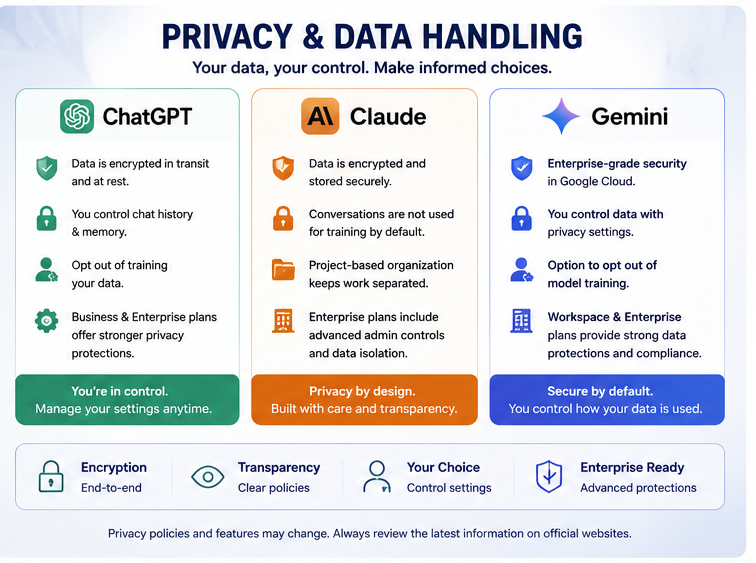
All three companies have published privacy policies describing how conversation data may be used, and each offers settings to control or limit data retention and training use. Policies and default settings change periodically, so if privacy is a top priority for you — especially for sensitive business or medical information — it’s worth checking each company’s current privacy and enterprise data policies directly before committing to a paid plan, rather than relying on older reviews.
Which One Should You Actually Choose?
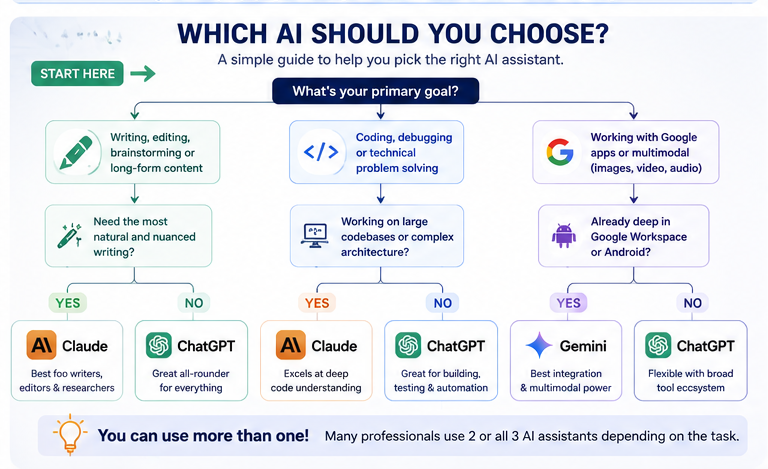
Here’s a simple way to think about it:
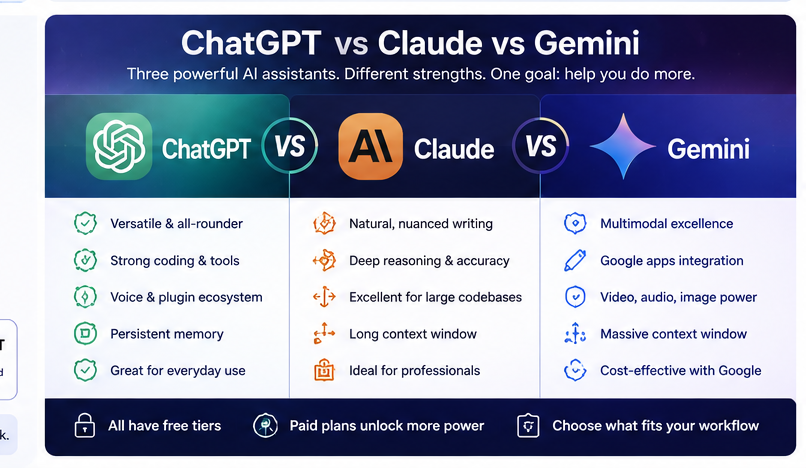
- Choose ChatGPT if you want the most flexible, general-purpose assistant with strong voice features, broad plugin and tool support, and a massive existing ecosystem of extensions and integrations.
- Choose Claude if your priority is high-quality writing, careful reasoning, reliable coding on complex projects, or working through long documents where accuracy and nuance matter more than speed.
- Choose Gemini if you’re deep in the Google ecosystem, need strong multimodal capabilities (especially video and image work), or want the most cost-effective option bundled with tools you’re already paying for.
Plenty of people end up using two or even all three, depending on the task — Claude for serious writing and coding, ChatGPT for quick everyday questions and voice chats, and Gemini for anything tied into Gmail, Docs, or Google Search. There’s no rule that says you have to pick just one.
Comparison Table: ChatGPT vs. Claude vs. Gemini (2026)
| Feature | ChatGPT | Claude | Gemini |
|---|---|---|---|
| Developer | OpenAI | Anthropic | |
| Current flagship family | GPT-5 series (Instant, Thinking, Pro) | Sonnet, Opus, and Mythos-tier models | Gemini 3 series (Pro, Flash, Deep Think) |
| Best for | General-purpose tasks, voice chat, broad plugin ecosystem | Long-form writing, nuanced reasoning, complex coding | Multimodal work, Google integration, video/image tasks |
| Coding strength | Strong, especially with autonomous coding agents | Excellent for large, complex, real-world codebases | Excellent for agentic and multimodal coding tasks |
| Context window | Large, growing steadily | Very large, well-suited to long documents | Very large, up to roughly 1M tokens |
| Multimodal support | Text, image, voice, limited video | Text, image, strong document understanding | Text, image, audio, video, native image generation |
| Memory across chats | Yes, persistent memory features | Limited, project-based organization | Tied to Google account and Workspace context |
| Free tier available | Yes | Yes | Yes, generous with a Google account |
| Ecosystem integration | Broad third-party plugin support | Growing developer and enterprise tools | Deep integration with Gmail, Docs, Sheets, Android |
| Writing style | Versatile, sometimes generic | Natural, nuanced, less repetitive | Clean, neutral, efficient |
| Ideal user | Everyday users, students, general professionals | Writers, developers, researchers, analysts | Google Workspace users, multimodal creators |
Frequently Asked Questions
1. Which AI is the best overall in 2026 — ChatGPT, Claude, or Gemini?
There isn’t a single winner that’s best at everything. ChatGPT is the most versatile all-rounder, Claude tends to lead in writing quality and careful reasoning, and Gemini is the strongest for multimodal work and Google integration. The right choice depends on what you actually use AI for most often.
2. Is Claude better than ChatGPT for coding?
Claude has consistently performed very well on real-world software engineering benchmarks and is known for explaining its reasoning clearly and avoiding invented code. ChatGPT is also excellent, particularly for autonomous, multi-step coding agents. For large, messy, real-world codebases, many developers lean toward Claude; for building full applications with heavier automation, ChatGPT’s coding tools are also a strong choice.
3. Which one is free to use?
All three — ChatGPT, Claude, and Gemini — offer free tiers with access to a capable default model. Free plans typically come with usage limits and restricted access to the most advanced reasoning modes, which are reserved for paid subscribers.
4. Does Gemini really work better with Google apps?
Yes. Because Google builds Gemini directly into Gmail, Docs, Sheets, and Android, it can pull context from those apps more naturally than ChatGPT or Claude, which generally require you to copy and paste content in manually unless you’re using a specific integration or browser extension.
5. Which AI produces the most natural-sounding writing?
Claude is widely regarded as producing writing that feels the least “AI-generated,” with fewer repetitive phrases and a more consistent voice across long pieces. ChatGPT is close behind and extremely flexible with tone, while Gemini tends to write in a clean, slightly more neutral style.
6. Can I trust these AI tools with sensitive personal or business data?
Each company publishes privacy policies and offers settings to limit data retention or training use, but policies do change over time. If you’re handling sensitive information — medical records, legal documents, or confidential business data — check each provider’s current enterprise and privacy terms directly rather than relying on general assumptions, and consider using business or enterprise tiers, which typically offer stronger data protections than free consumer plans.
7. Is it worth paying for more than one AI subscription?
For many professionals, yes. Since each model has different strengths, some people subscribe to two — for example, Claude for writing and coding plus Gemini for its Google integration — rather than trying to force one tool to do everything. If budget is a concern, start with whichever free tier best matches your main use case, and upgrade only once you’ve identified where a paid plan actually saves you time.
AI models and pricing change frequently. Before making a purchasing decision, it’s a good idea to check each company’s official website for the most current model lineup, pricing, and features.
Read Also…..
Gemini AI: The Complete 2026 Guide to Google’s Most Powerful AI Assistant
Claude AI Review 2026: Is It Really Worth Using? My Honest Take
ChatGPT Review 2026: Features, Pricing, Pros, Cons & Is It Worth It?

Hey, I’m Manish
I’ve tested 100+ AI tools since 2023 and reviewed them honestly on ZentroAI.
My mission: Help you discover the best AI tools without the hype.
Whether you need ChatGPT alternatives, coding assistants, or image generators .
you’ll find detailed, hands-on reviews here.