Claude AI Review 2026:
If you’ve spent any time online in the last couple of years, you’ve probably heard people talking about AI chatbots in almost the same breath as smartphones — like they’ve quietly become something we just use now, without really announcing it. ChatGPT gets most of the headlines, but there’s another name that keeps coming up in conversations among writers, developers, and people who just want a smarter way to get through their workday: Claude, made by a company called Anthropic.
I spent a good chunk of time actually using Claude across different tasks — writing, coding, research, organizing messy notes, even just chatting through ideas — before sitting down to write this. So this isn’t a rehashed press release. It’s a plain, human breakdown of what Claude actually does well, where it falls short, and whether it’s worth your time or money in 2026.
What Exactly Is Claude AI ?
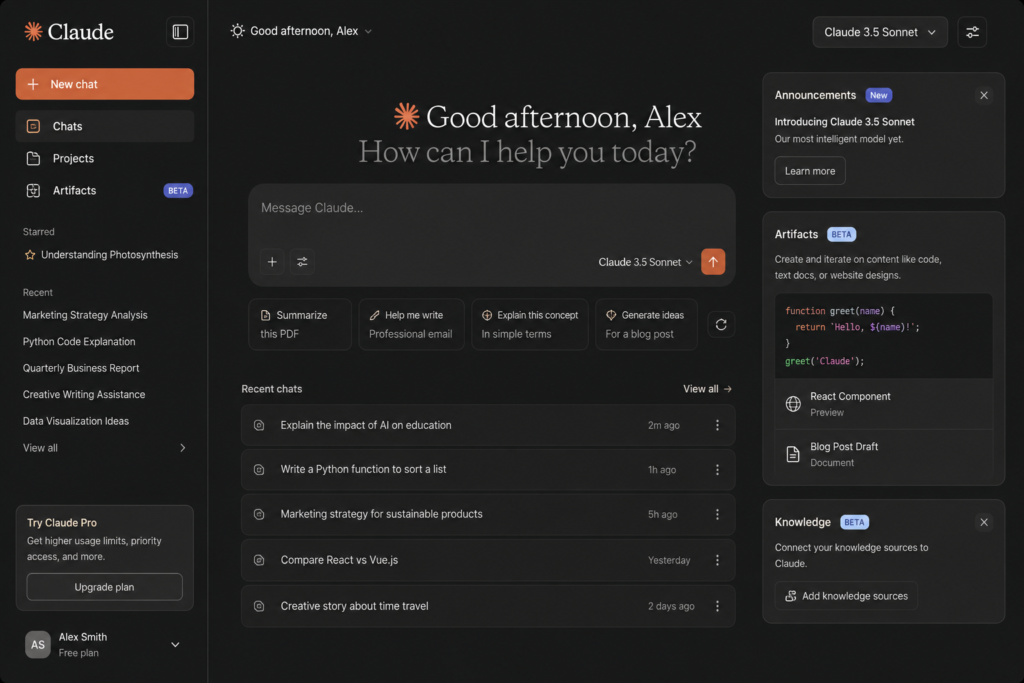
Claude is an AI assistant built by Anthropic, a company founded by former OpenAI researchers who wanted to build AI with safety and reliability baked in from the start, not bolted on afterward. You can use it through a website (claude.ai), a mobile app, a desktop app, or through tools built for developers and businesses.
At its core, Claude is a large language model — meaning it’s been trained on enormous amounts of text so it can understand questions, hold a conversation, write, summarize, analyze, and reason through problems. But “chatbot” undersells what it can actually do today. It can read and edit documents, build spreadsheets, write and run code, search the web for current information, and even create slide decks or PDFs you can download and use right away.
Best offers a few different versions of the underlying model — generally a lighter, faster one for quick tasks, a balanced mid-tier one that most people end up using day to day, and a heavier, more capable one for complex reasoning or research-grade work. You don’t need to memorize the names; the interface usually picks a sensible default, and you can switch manually if you want more power or more speed.
First Impressions: Clean, Calm, and Not Trying to Be Flashy
Honest Claude AI Review
The first thing I noticed about Claude is how understated the design is. There’s no clutter, no constant pop-ups nudging you toward upgrades every five seconds, and no overwhelming menu of toggles you have to understand before you can ask a basic question. You open it, you type, and it responds — clearly and without a lot of throat-clearing.
That calmness carries into the writing style too. Claude tends to avoid the over-enthusiastic, exclamation-point-heavy tone some AI tools default to. It reads more like a competent colleague than a hype machine. If you’ve ever been annoyed by an AI assistant that responds to a simple question with “Great question! I’d love to help you with that!” — Claude is noticeably more restrained, and honestly, that’s a relief.
Where Claude Actually Shines?

Writing and editing:-
This is probably Claude’s strongest single use case. Whether it’s drafting an email, tightening up a paragraph, rewriting something in a different tone, or helping structure a long piece of writing, it tends to produce text that doesn’t sound stiff or robotic. It’s also genuinely good at following specific instructions about tone, length, and style instead of ignoring them halfway through a long response.
Coding and technical work:-
Developers have become some of Claude’s most vocal fans, and after testing it on a handful of coding tasks, I get why. It explains its reasoning instead of just dumping code at you, it’s good at debugging when you paste in an error message, and it can work across multiple files in a project rather than treating every question like it’s starting from zero. There’s also a dedicated coding tool for people who want an AI assistant working directly inside their command line or code editor, which is a notch above just copy-pasting code into a chat window.
Document and file handling:-
This is where Claude quietly pulls ahead of a lot of competitors. You can hand it a messy spreadsheet, a long PDF report, or a half-finished slide deck, and it can read it, work with it, and hand back an actual usable file — not just a description of what you should do. For anyone who deals with reports, contracts, or research documents regularly, this saves a real amount of time.
Reasoning through complicated questions:-
Ask Claude something with a lot of moving parts — a business decision with trade-offs, a tricky bit of logic, a comparison between options — and it tends to actually walk through the reasoning rather than jumping straight to a confident-sounding answer. It’s also generally willing to say “it depends” or lay out both sides instead of pretending there’s always one clean answer.
Searching for current information:-
When a question needs up-to-date facts — recent news, current prices, who holds what job right now — Claude can search the web and pull in fresh information rather than guessing based on outdated training data. This matters more than people realize, since a confidently wrong answer is worse than no answer at all.
Where Claude Falls Short?
No tool is perfect, and a review that only lists positives isn’t a review — it’s an ad. So here’s where Claude genuinely has room to improve.
No native image or video generation. Unlike some competitors that bundle image generation directly into the chat, Claude is focused on text, documents, and structured content. If you want AI-generated artwork or video, you’ll need a different tool for that part of your workflow.
Usage limits on lower tiers. The free version is genuinely useful for casual use, but if you lean on it heavily during the day, you’ll bump into limits faster than you might expect. Anthropic doesn’t publish exact message counts, which can feel a little opaque if you’re trying to plan around it.
It can still get things wrong. Like every AI model out there, Claude can occasionally state something inaccurate with total confidence, especially on niche or rapidly changing topics. It’s noticeably better about this than a lot of competitors, but “better” doesn’t mean “perfect.” Treat it like a sharp, well-read assistant — not an infallible oracle — and double-check anything that actually matters before you act on it.
Pricing can climb quickly for power users. The entry-level paid plan is reasonably priced, but if you’re a heavy daily user or running it for a small team, costs can stack up. More on that below.
What Does Claude Actually Cost?
Claude AI Review 2026 Pricing: Free vs Paid

Pricing has shifted a bit over time, so treat these as a snapshot rather than gospel — it’s always worth double-checking the official pricing page before you commit to anything.
- Free — $0, no credit card needed. Good for casual use, basic writing help, and trying things out, with daily usage limits.
- Pro — around $20/month (a bit less if you pay annually). This is the tier most regular individual users land on. It unlocks higher usage limits, access to more capable models, and extra tools like file creation and coding features.
- Max — starts around $100/month, with a higher-usage version around $200/month. Built for people who use Claude constantly throughout the workday and keep hitting limits on Pro.
- Team — priced per seat, generally in the $20–30 range per person per month for a standard seat, with a premium seat tier above that. Designed for small businesses and teams that want shared billing and admin controls.
- Enterprise — custom pricing, aimed at larger organizations that need advanced security, compliance features, and dedicated support.
There’s also a separate pay-as-you-go option for developers building Claude into their own apps, priced by how much text goes in and comes out — but that’s really a different product aimed at a different audience than the average person chatting with Claude day to day.
How Does It Compare to Other AI Chatbots ?
I’ll keep this section short, because head-to-head AI comparisons go stale fast as every company ships updates constantly. In broad strokes: Claude tends to be praised for writing quality, coding ability, and handling long documents carefully. Competing tools sometimes have an edge in areas like image generation or sheer name recognition, since they’ve been around in the public eye a bit longer.
Realistically, the most honest answer is that the gap between the top AI assistants has narrowed a lot, and the “best” one often comes down to what you personally use it for. If your work revolves around writing, documents, and code, Claude is consistently one of the strongest options out there. If you need built-in image generation as your main use case, you may want to pair it with another tool for that specific job.
Who Should Actually Use Claude?
(After Use I”ll Give You Claude AI Review)
- Writers, editors, and content creators who want a thoughtful drafting and editing partner rather than a generic text generator.
- Developers who want an AI that can reason through code, explain its logic, and work across a real project instead of isolated snippets.
- Students and researchers who need help digesting long documents, organizing notes, or working through complex topics step by step.
- Small business owners and professionals who deal with reports, spreadsheets, and client documents regularly and want to save time on the repetitive parts.
- Teams that want a shared AI tool with admin controls and centralized billing rather than everyone paying individually.
If your main interest is AI-generated images or videos, or you only need an AI tool a handful of times a month, the free tier (or a different specialized tool) might genuinely serve you better than paying for a subscription.
Final Verdict
Claude AI Review Final Verdict
After actually putting Claude through its paces, my honest takeaway is this: it’s one of the more thoughtful, capable AI assistants available right now, especially if your work leans toward writing, coding, or document-heavy tasks. It doesn’t try to dazzle you with gimmicks — it just tends to get the job done cleanly, explain itself along the way, and avoid the overconfident tone that makes some AI tools hard to trust.
It’s not flawless. There are real gaps — no built-in image generation, usage limits that can feel restrictive on the free tier, and the occasional confident-but-wrong answer like any AI model. But weighed against its strengths, those feel like reasonable trade-offs rather than dealbreakers.
If you’re on the fence, the free plan costs nothing and gives you a genuine feel for whether Claude fits how you work. For a lot of people — myself included — that free trial run is usually what turns into a Pro subscription a few weeks later, once you realize how much time it’s actually saving you.
Bottom line: Claude AI earns its growing reputation. It’s not the loudest name in the AI space, but for serious, day-to-day work, it’s quietly become one of the most reliable tools out there. ( How Was the Claude AI Review)
Quick Questions People Ask Claude AI Review(FAQ)
Is Claude AI free to use?
Yes. There’s a genuinely usable free plan with no credit card required. It has lower usage limits than the paid tiers, but it’s enough to figure out whether Claude fits the way you work before spending anything.
Is Claude better than ChatGPT?
“Better” depends heavily on what you’re doing with it. Claude tends to get praised more for writing quality, document handling, and coding reasoning, while other tools have their own strengths in different areas. It’s worth trying both on your actual tasks rather than trusting any single ranking, since the right tool really depends on your specific workflow.
Can Claude create files like Word documents or spreadsheets?
Yes, on the paid plans Claude can generate and hand back actual files — documents, spreadsheets, presentations, and PDFs — rather than just describing what the content should look like.
Does Claude have a mobile app?
Yes, it’s available on iOS and Android, along with the web version and a desktop app, so conversations and work can carry over between devices.
Is it safe to share sensitive information with Claude?
As a general rule, it’s best to treat any AI chatbot the way you’d treat a third-party online service: avoid pasting in highly sensitive personal, medical, or financial details unless you’ve checked the specific privacy and data-handling terms for the plan you’re using, since these can differ between the free tier, paid plans, and business accounts.
After Read Claude AI Review ,Please Read ChatGPT Review …….
Did You Like Claude AI Review


Hey, I’m Manish
I’ve tested 100+ AI tools since 2023 and reviewed them honestly on ZentroAI.
My mission: Help you discover the best AI tools without the hype.
Whether you need ChatGPT alternatives, coding assistants, or image generators .
you’ll find detailed, hands-on reviews here.