Grok AI Review
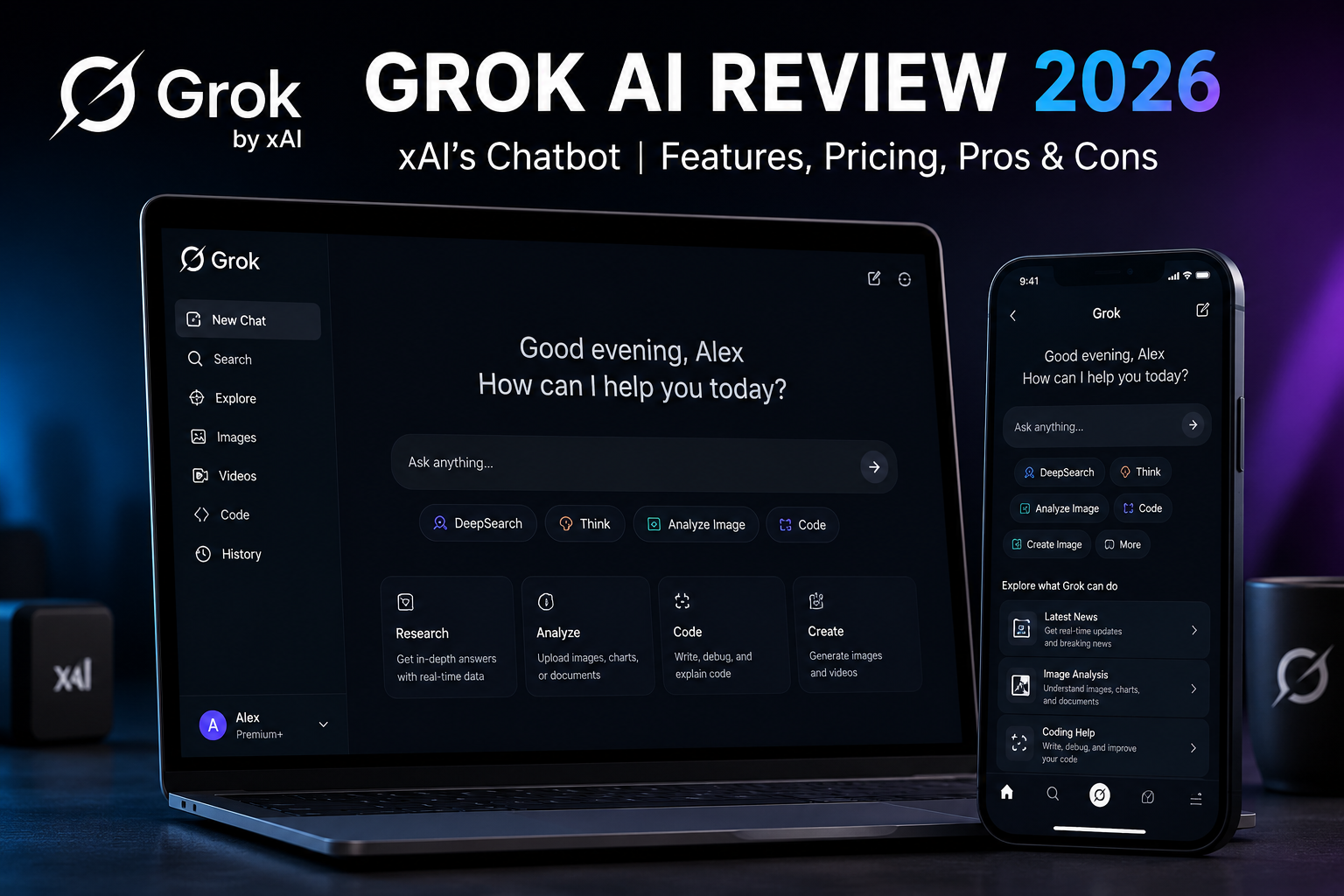
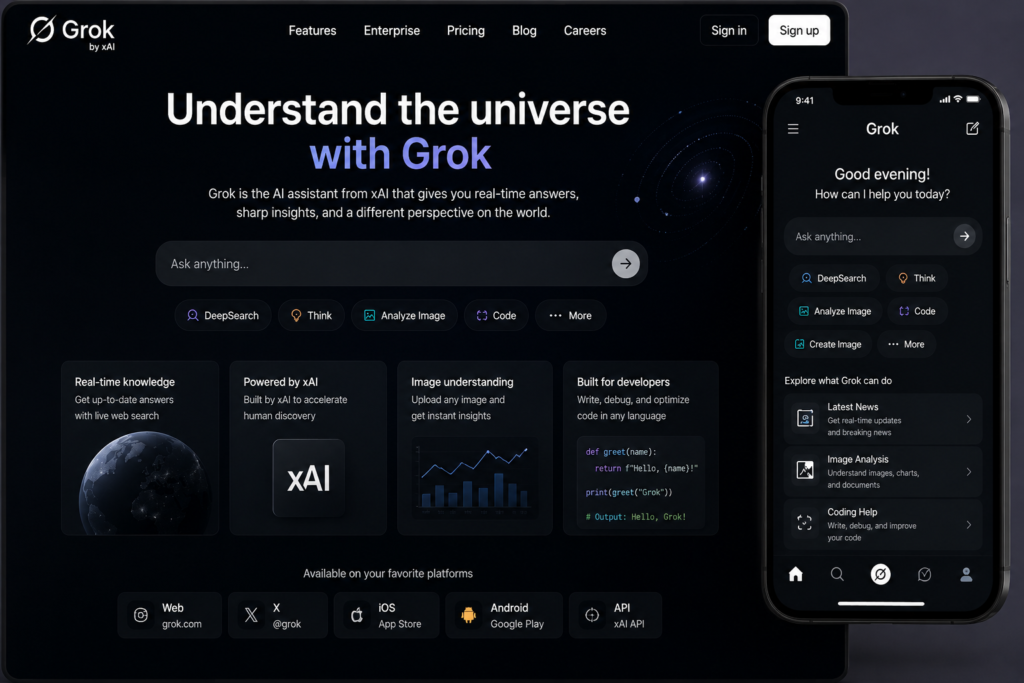
Artificial intelligence has become more competitive than ever, and Grok is one of the biggest reasons why. Built by xAI, Elon Musk’s AI company, Grok has evolved from a chatbot available only on X (formerly Twitter) into a full-featured AI assistant that can write, code, analyze images, search the web, and help with research.
What makes Grok different isn’t just its technology—it’s the way it approaches conversations. Unlike many AI assistants that rely heavily on cautious responses, Grok aims to answer questions more directly while combining live web information with real-time posts from X. That gives it an advantage when you’re following breaking news, trending topics, sports, or financial markets.
After spending time using Grok for writing, coding, research, image analysis, and everyday tasks, it’s clear that the platform has improved significantly over the past few years. It’s fast, capable, and packed with useful features, but it’s not perfect. Some areas still lag behind competitors, and whether it’s worth paying for depends largely on how you plan to use it.
In this review, we’ll look at what Grok does well, where it falls short, how much it costs, and whether it deserves a place in your AI toolkit in 2026.
What Is Grok AI?
Grok is a conversational AI assistant developed by xAI, the artificial intelligence company founded by Elon Musk in 2023. The company describes its mission as building AI systems that help people understand the universe by providing useful, accurate, and reasoning-focused answers.
The name “Grok” comes from Robert A. Heinlein’s science fiction novel Stranger in a Strange Land, where the word means to understand something deeply and intuitively. That philosophy is reflected in the chatbot’s design, which focuses on reasoning through problems instead of simply generating quick responses.
Since its launch, Grok has expanded well beyond a simple chatbot. Today it supports a wide range of tasks, including:
- Writing articles, emails, and marketing content
- Answering research questions using live web information
- Programming and debugging code
- Solving mathematical problems
- Summarizing PDFs and documents
- Understanding screenshots and images
- Generating images through its creative tools
- Assisting with brainstorming and productivity tasks
One of Grok’s biggest strengths is its close integration with X (formerly Twitter). Unlike most AI assistants that mainly rely on traditional web searches, Grok can also use public conversations and trending posts on X to provide additional context for fast-moving events.
You can currently access Grok through:
- Grok.com
- The X platform
- Official mobile apps for Android and iPhone
- The xAI API for developers
The platform is available with both free and paid plans, making it easy to try before deciding whether a subscription is worthwhile.
Grok’s Model Lineup
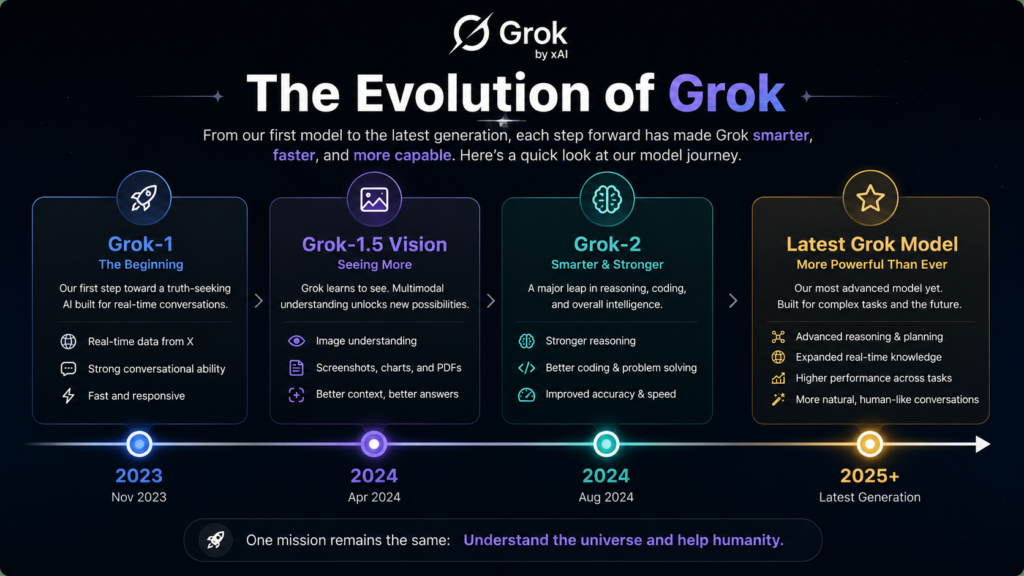
One thing that often confuses new users is that “Grok” isn’t a single AI model. Like ChatGPT and Gemini, Grok has gone through several generations, with each release improving reasoning, speed, coding, and multimodal capabilities.
Here’s a quick overview of its evolution.
Grok-1
Released in late 2023, Grok-1 was xAI’s first public model. It introduced conversational AI with access to live information from X, making it stand out from competitors that relied mainly on static knowledge.
Although impressive for its time, Grok-1 has now been replaced by newer and more capable models.
Grok-1.5 Vision
The next major update added multimodal capabilities.
Users could upload:
- screenshots
- charts
- diagrams
- photographs
- documents
and ask Grok to analyze or explain them.
This update made Grok much more useful for students, developers, and professionals who regularly work with visual information.
Grok-2
Grok-2 represented a major improvement in overall quality.
Compared to earlier versions, it offered:
- stronger reasoning
- better coding performance
- more natural writing
- improved accuracy
- faster responses
For many users, Grok-2 marked the point where the platform became a serious competitor to ChatGPT, Gemini, and Claude.
Latest Grok Models
xAI continues to update Grok regularly with improvements in reasoning, coding, and multimodal understanding. Depending on your subscription, you’ll have access to different model versions and capabilities, with paid plans typically receiving the newest releases first.
The latest models focus on:
- better logical reasoning
- longer conversation memory
- improved coding assistance
- faster response times
- stronger image understanding
- more accurate web research
Rather than worrying about specific model names, most users simply choose the latest available version included in their subscription.
Key Features That Make Grok Stand Out
While many AI assistants now offer similar core capabilities, Grok has several features that genuinely help it stand out.
1. Real-Time Web Search
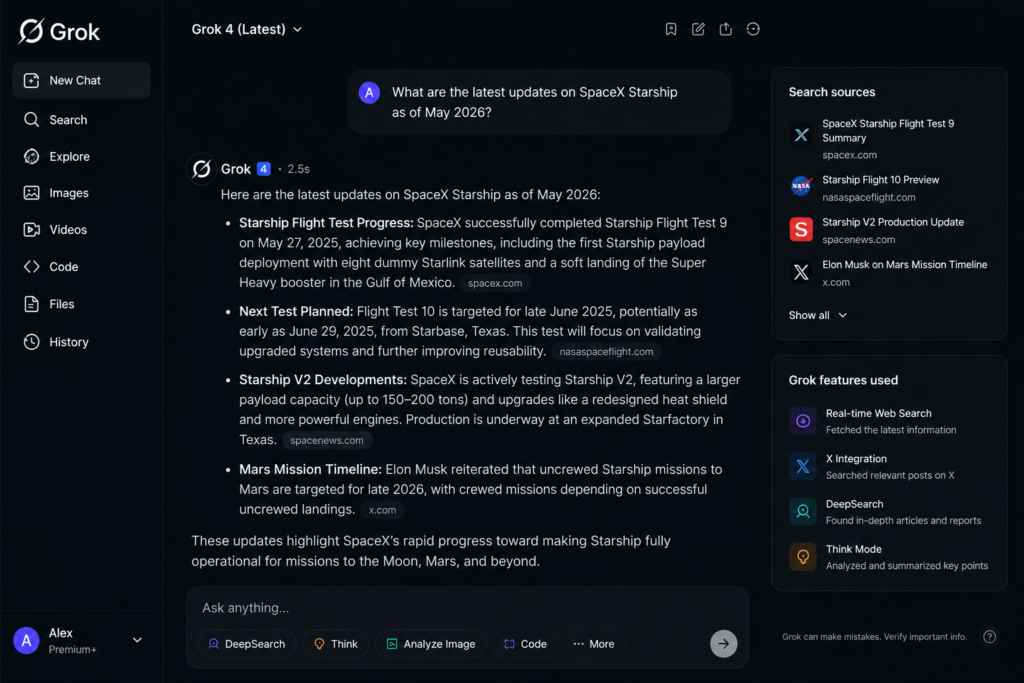
One of Grok’s biggest advantages is access to current information.
Instead of relying solely on pre-trained knowledge, Grok can search the web and combine information from multiple sources before answering your question.
This makes it particularly useful for:
- breaking news
- sports scores
- financial markets
- product launches
- technology updates
- political events
- trending discussions
If your work depends on staying informed, Grok is one of the strongest AI assistants currently available.
2. Integration with X
Because xAI and X operate within the same ecosystem, Grok has a unique advantage.
It can analyze public posts, trending topics, and conversations happening across X, giving users additional context that many competing AI assistants simply can’t provide.
For journalists, marketers, creators, and social media managers, this integration is genuinely useful.
3. Strong Research Capabilities
Research is another area where Grok performs well.
Instead of returning a quick summary, it often combines information from multiple sources into a structured response.
Whether you’re researching technology, science, finance, or business topics, Grok can significantly reduce the amount of manual searching required.
That said, it’s still a good idea to verify important facts using original sources, especially when accuracy is critical.
4. Coding Assistance
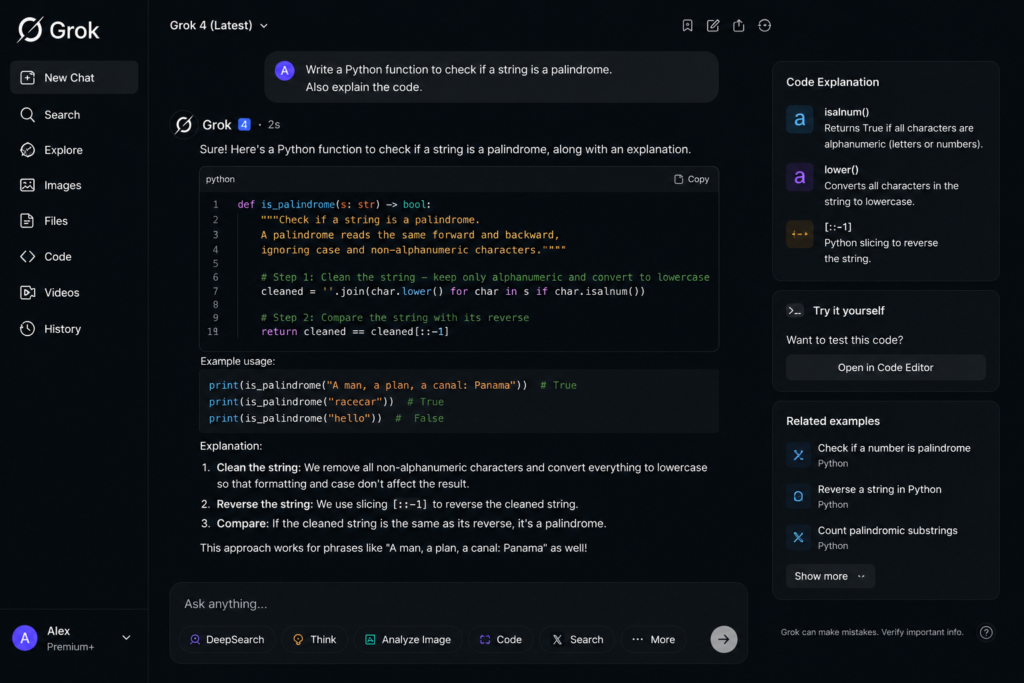
Developers will find plenty to like.
Grok can:
- explain code
- generate new programs
- debug errors
- optimize existing code
- convert between programming languages
- help understand unfamiliar frameworks
It supports popular languages including:
- Python
- JavaScript
- C++
- Java
- Go
- Rust
- SQL
For everyday programming tasks, its performance is impressive and continues to improve with each model update.
5. Image Understanding
Modern AI isn’t just about text anymore.
Grok can understand uploaded images and help with tasks like:
- explaining charts
- reading graphs
- interpreting screenshots
- identifying objects
- summarizing documents
- extracting text from images
This makes it useful for students, business users, and professionals who frequently work with visual content.
6. Content Writing
Although Grok is often praised for research and coding, it’s also a capable writing assistant.
You can use it to create:
- blog posts
- emails
- social media captions
- product descriptions
- ad copy
- business documents
- summaries
- brainstorming ideas
Its writing style tends to feel more conversational than overly formal, which many users appreciate.
7. Speed and Performance
One thing you’ll notice immediately is how quickly Grok responds.
Even longer prompts typically generate answers within seconds, making it feel responsive enough for everyday work.
Whether you’re asking simple questions or tackling more complex tasks, waiting times are generally minimal.
Grok AI Pricing (2026)
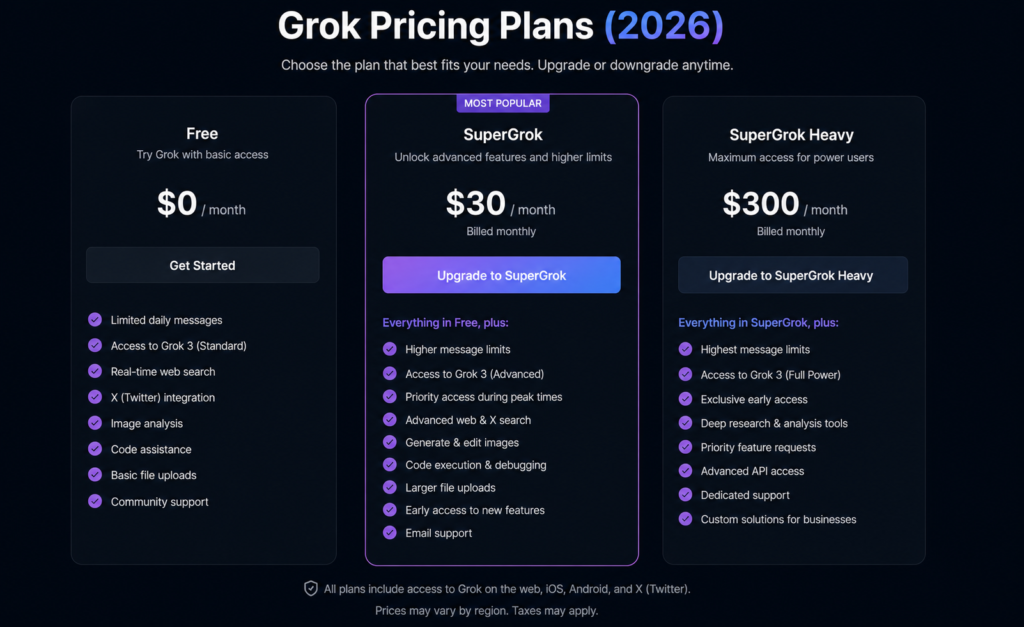
Grok offers both free and paid access, allowing users to choose a plan that matches their needs.
Free Plan
The free version is a good starting point for casual users.
It includes:
- limited daily usage
- access to core AI features
- writing assistance
- coding help
- image understanding
- basic research
While usage limits apply, it’s generous enough for occasional use.
Premium Plans
Users who need higher limits and access to the newest models can upgrade to one of Grok’s paid subscriptions.
Paid plans generally include:
- priority access during busy periods
- higher message limits
- faster responses
- access to newer AI models
- enhanced research capabilities
- advanced image generation features
- additional productivity tools
Pricing can vary by region and may change over time, so it’s always worth checking the official Grok pricing page before subscribing.
For most individuals, the standard paid plan offers the best balance between cost and features, while heavy users and businesses may benefit from higher-tier subscriptions.
Grok AI Pros and Cons
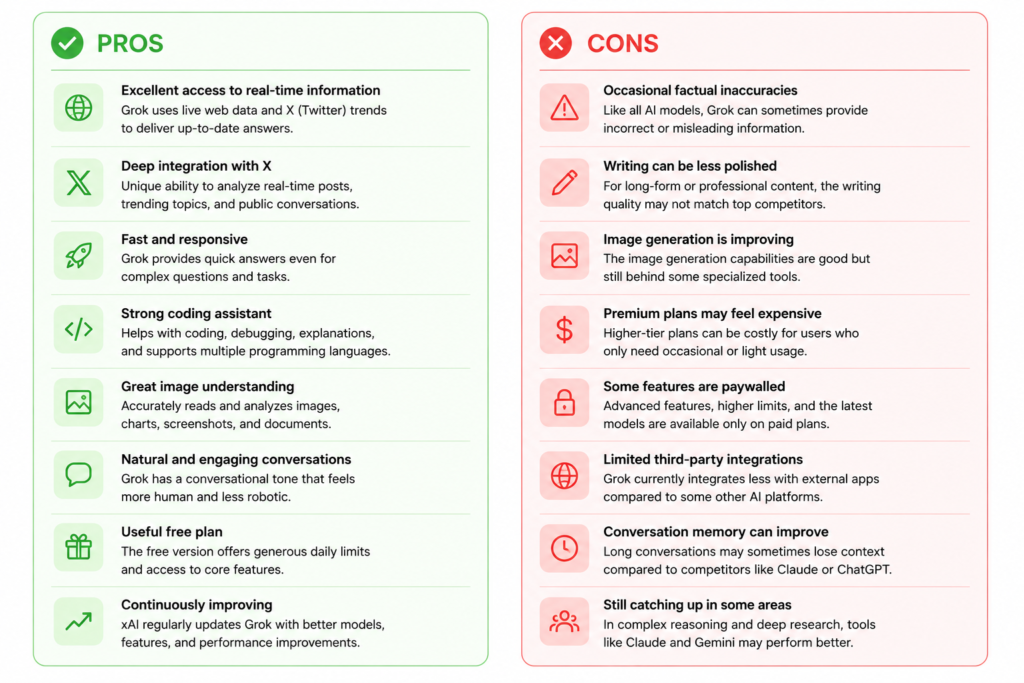
Like every AI assistant, Grok has strengths as well as limitations.
Pros
- Excellent access to current information through web search.
- Strong integration with X for trending topics and public discussions.
- Fast response times, even for complex prompts.
- Very capable coding assistant for everyday development work.
- Good multimodal support for images and documents.
- Natural conversational style that feels less robotic.
- Free version is useful for casual users.
- Continues to improve through frequent model updates.
Cons
- Writing quality can occasionally feel less polished than some competitors.
- Responses may still contain factual mistakes or hallucinations, especially on highly specialized topics.
- Image generation continues to improve but isn’t always the best choice for professional creative work.
- Premium plans may feel expensive for users who only need occasional AI assistance.
- Some advanced features are available only with paid subscriptions.
Overall, Grok has matured into one of the strongest general-purpose AI assistants available today. Its combination of real-time information, coding ability, research tools, and multimodal features makes it an excellent choice for many users. However, it’s still worth comparing it with alternatives like ChatGPT, Gemini, and Claude to determine which one best fits your workflow.
Grok vs ChatGPT vs Gemini vs Claude: Which AI Assistant Is Better?
Choosing the right AI assistant isn’t as simple as picking the one with the biggest headlines. Each platform has its own strengths, and the best option depends on what you use AI for every day. After testing Grok alongside ChatGPT, Gemini, and Claude across writing, coding, research, and productivity tasks, here’s how they compare.
Grok vs ChatGPT
ChatGPT remains one of the most polished AI assistants available. It excels at long-form writing, brainstorming, editing, business communication, and creative projects. The responses usually feel more refined, making it a great choice for bloggers, marketers, students, and professionals.
Grok, on the other hand, shines when you need up-to-date information. Its ability to combine web results with public conversations on X makes it particularly useful for following breaking news, market trends, sports, and technology updates.
If your priority is writing polished articles or professional documents, ChatGPT still has a slight edge. But if your work depends on staying informed about what’s happening right now, Grok is often the better choice.
Grok vs Gemini
Google Gemini integrates seamlessly with Google services like Gmail, Docs, Drive, and Sheets. If you’re already invested in Google’s ecosystem, Gemini offers excellent productivity features.
Grok focuses more on research, coding, and real-time information. It also has a more conversational personality, which many users find engaging.
Gemini generally performs better for users who spend most of their day working inside Google’s apps, while Grok is a stronger option for live information and trend analysis.
Grok vs Claude
Claude has earned a strong reputation for handling complex reasoning, document analysis, and software architecture. Many developers appreciate its ability to explain technical concepts clearly and work through large codebases.
Grok has improved significantly in coding and debugging, making it more than capable for everyday development tasks. It can generate code, explain errors, and assist with multiple programming languages. However, for highly complex architectural planning or lengthy technical documentation, many professionals still prefer Claude.
Which One Should You Choose?
There isn’t a single AI assistant that’s best at everything.
Choose Grok if you want:
- Fast access to current information
- Strong web research capabilities
- Coding assistance
- Real-time trends from X
- A conversational, direct AI assistant
Choose ChatGPT if your focus is:
- Long-form writing
- Creative content
- Business communication
- Brainstorming
- General productivity
Choose Gemini if you primarily work with:
- Gmail
- Google Docs
- Google Drive
- Google Workspace
Choose Claude if you need:
- Complex reasoning
- Technical documentation
- Software architecture
- Large document analysis
Many professionals actually use two AI assistants instead of relying on just one. For example, they might use Grok for research and ChatGPT for polishing the final content.
Who Should Use Grok AI?
Grok isn’t designed for just one type of user. Its feature set makes it suitable for a wide range of people.
Content Creators
Bloggers, YouTubers, and social media creators can use Grok for:
- researching topics
- generating ideas
- writing outlines
- creating captions
- finding trending discussions
Its ability to quickly summarize information can save hours of research.
Developers
Whether you’re learning to code or working professionally, Grok can help with:
- debugging
- explaining code
- writing scripts
- learning programming languages
- solving coding problems
- generating sample projects
It’s especially useful as a coding companion rather than a replacement for human expertise.
Students
Students can use Grok to:
- summarize study material
- explain difficult concepts
- solve practice questions
- organize notes
- prepare for exams
Of course, AI should support learning—not replace it.
Researchers
Because Grok combines web search with conversational AI, it’s useful for gathering information across multiple sources before diving deeper into official references.
Business Professionals
Professionals can use Grok for:
- drafting emails
- creating reports
- brainstorming ideas
- market research
- competitor analysis
- meeting summaries
Its speed makes it particularly helpful during busy workdays.
Getting Started with Grok
If you’re new to Grok, getting started is straightforward.
Step 1: Create an Account
Visit the official Grok website or access Grok through X using your existing account.
Step 2: Try the Free Version
The free plan offers enough features to understand how the platform works before deciding whether a paid subscription makes sense.
Step 3: Experiment with Different Prompts
Try asking Grok to:
- write an email
- explain a technical topic
- summarize an article
- solve a coding problem
- analyze an image
- brainstorm ideas
Testing different tasks gives you a better understanding of its strengths.
Step 4: Upgrade Only If Needed
If you frequently hit usage limits or want access to newer AI models and premium features, upgrading to a paid plan may be worthwhile.
For occasional users, however, the free version is often enough.
What Are Users Saying About Grok?
Most user feedback has been positive, especially among people who regularly follow technology, finance, and current events.
Common praise includes:
- Fast responses
- Helpful coding assistance
- Strong research capabilities
- Access to recent information
- Easy-to-use interface
- Natural conversation style
Users also appreciate that Grok feels less formal than many competing AI assistants, making conversations feel more natural.
However, no AI tool is perfect.
Some users mention:
- occasional factual errors
- inconsistent writing quality on very long articles
- premium pricing
- limited availability of certain advanced features on the free plan
These criticisms aren’t unique to Grok. Every major AI assistant occasionally makes mistakes, so it’s always wise to verify important information before relying on it.
Final Verdict
Grok has grown into one of the strongest AI assistants available in 2026. What started as a chatbot closely tied to X has evolved into a capable platform for writing, coding, research, image analysis, and everyday productivity.
Its biggest strength is staying current. If you regularly need information about breaking news, technology, financial markets, or trending discussions, Grok performs exceptionally well. Combined with solid coding support, fast responses, and a clean user experience, it offers excellent value for many users.
That doesn’t mean it’s the perfect AI assistant for everyone. Writers focused on highly polished long-form content may still prefer ChatGPT, while users deeply invested in Google’s ecosystem might find Gemini more convenient. Developers working on highly complex projects may also appreciate Claude’s reasoning abilities.
Still, Grok strikes an impressive balance between speed, research, and versatility. The free version is capable enough for casual users, while paid plans unlock additional features for professionals and heavy users.
If you’re curious about what Grok can do, start with the free plan and spend a few days testing it with your own workflow. That’s the easiest way to decide whether it’s worth adding to your AI toolkit.
Frequently Asked Questions
Is Grok AI free to use?
Yes. Grok offers a free plan with limited usage, allowing users to explore its core features without paying. Paid subscriptions provide higher usage limits and access to newer models and advanced capabilities.
Is Grok better than ChatGPT?
It depends on what you need. Grok is excellent for real-time information, research, and coding assistance, while ChatGPT generally produces more polished long-form writing and creative content.
Can Grok generate images?
Yes. Grok includes image-generation capabilities along with image understanding, allowing users to create visuals from text prompts and analyze uploaded images.
Is Grok good for coding?
Yes. Grok performs well for debugging, code generation, explaining programming concepts, and assisting with multiple programming languages. It’s a reliable coding assistant for most everyday development tasks.
Is Grok worth paying for?
If you use AI regularly for research, coding, content creation, or productivity, the paid plan can be worthwhile because it offers higher usage limits, faster responses, and access to the latest features. Casual users may find the free version sufficient for their needs.
Can Grok replace Google Search?
Not entirely. While Grok is excellent at summarizing information and answering questions quickly, it’s still a good idea to visit original sources when researching important topics or verifying facts.
Who should use Grok AI?
Grok is a great choice for students, developers, researchers, content creators, business professionals, and anyone who wants an AI assistant that combines strong reasoning with access to current information.
Final Thoughts
Grok has matured into a well-rounded AI platform that competes confidently with ChatGPT, Gemini, and Claude. While each assistant has its own strengths, Grok stands out for its real-time knowledge, strong research capabilities, and practical approach to everyday tasks. If those features align with your needs, it’s definitely worth trying before deciding on a subscription.
Read Also…..

Hey, I’m Manish
I’ve tested 100+ AI tools since 2023 and reviewed them honestly on ZentroAI.
My mission: Help you discover the best AI tools without the hype.
Whether you need ChatGPT alternatives, coding assistants, or image generators .
you’ll find detailed, hands-on reviews here.