Microsoft Copilot Review
If you’ve spent any time in Word, Excel, Outlook, or Teams over the past year, you’ve probably seen that little Copilot icon staring back at you, quietly asking to help. Microsoft has bet big on Copilot, weaving it into practically every corner of its software empire, and by 2026 it’s no longer a novelty feature — it’s a genuine part of how millions of Americans work, write, and manage their inboxes.
But “AI assistant built into Office” sounds great in a keynote. The real question, especially if you’re the one paying the bill, is whether Copilot actually earns its keep once the excitement wears off. I spent several weeks putting it through daily use across Word, Excel, Outlook, Teams, and the standalone Copilot app to find out. This review breaks down what Copilot does well, where it stumbles, what it costs in 2026, and who should (and shouldn’t) bother signing up.
What Exactly Is Microsoft Copilot?
Microsoft Copilot is an AI assistant built on large language models, primarily from OpenAI, though 2026 updates have introduced the option to use Anthropic’s models inside certain agentic tools like Excel’s Agent Mode. Unlike a standalone chatbot, Copilot is designed to live inside the apps you already use every day. It can draft a report in Word, build a pivot table in Excel, summarize a meeting in Teams, or triage your inbox in Outlook, all without you leaving the app.
There isn’t just one “Copilot” anymore, either. By 2026, Microsoft has split it into several distinct products:
- Copilot (Free) — a web-grounded AI chat available through Windows, Edge, and the Copilot app, with no connection to your personal files or work data.
- Microsoft 365 Premium — the consumer plan that folds Copilot’s writing and image tools into Word, Excel, PowerPoint, and Outlook, along with expanded cloud storage. This replaced the old standalone Copilot Pro subscription in late 2025.
- Microsoft 365 Copilot (Business/Enterprise) — the workplace version, which connects to your organization’s emails, files, chats, and calendar through Microsoft Graph, and now includes multi-step “agentic” task automation.
- Copilot Studio — a platform for building custom AI agents, billed separately through a credit system.
That’s a lot of branding under one name, and honestly, it’s the single most confusing part of using Copilot in 2026. Once you understand which tier you actually need, though, the picture gets much clearer.
Setting Up and First Impressions
Getting started with Copilot is painless if you’re already inside the Microsoft ecosystem. If your organization has an eligible Microsoft 365 plan, an admin flips a switch and the Copilot icon simply appears in your ribbon. For personal use, upgrading to Microsoft 365 Premium unlocks the same experience across your home apps.
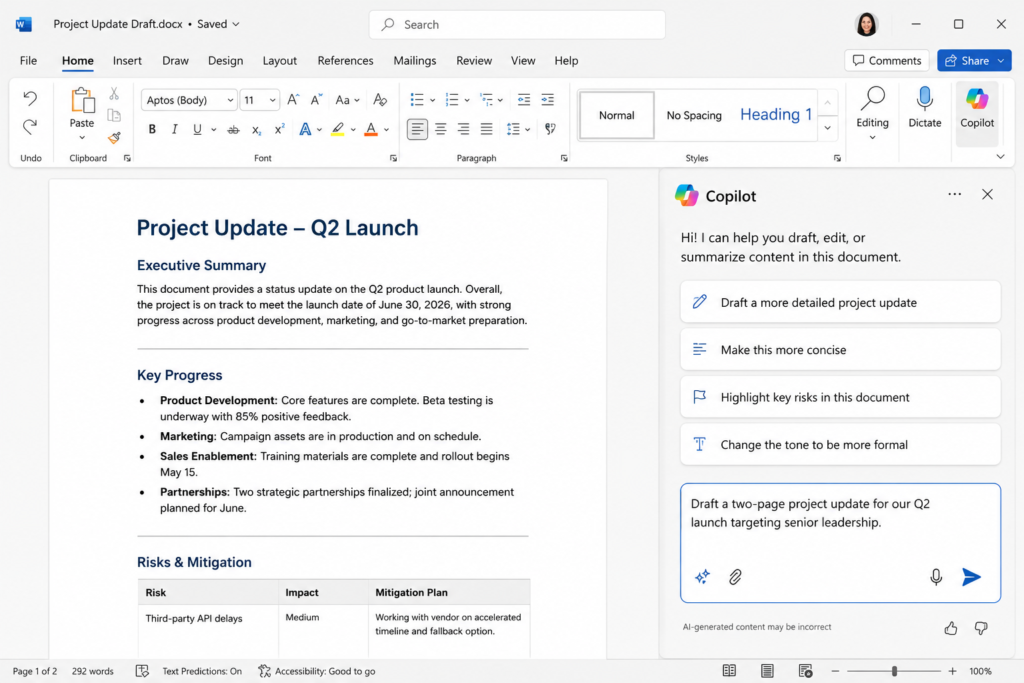
The interface itself is unobtrusive. It shows up as a sidebar in Word and Excel, a chat panel in Teams, and a “summarize this thread” prompt in Outlook. There’s no separate app to learn for most day-to-day use, which is honestly one of Copilot’s biggest advantages over competitors — you’re not switching context to a browser tab to get help.
Copilot in Word: Drafting and Editing
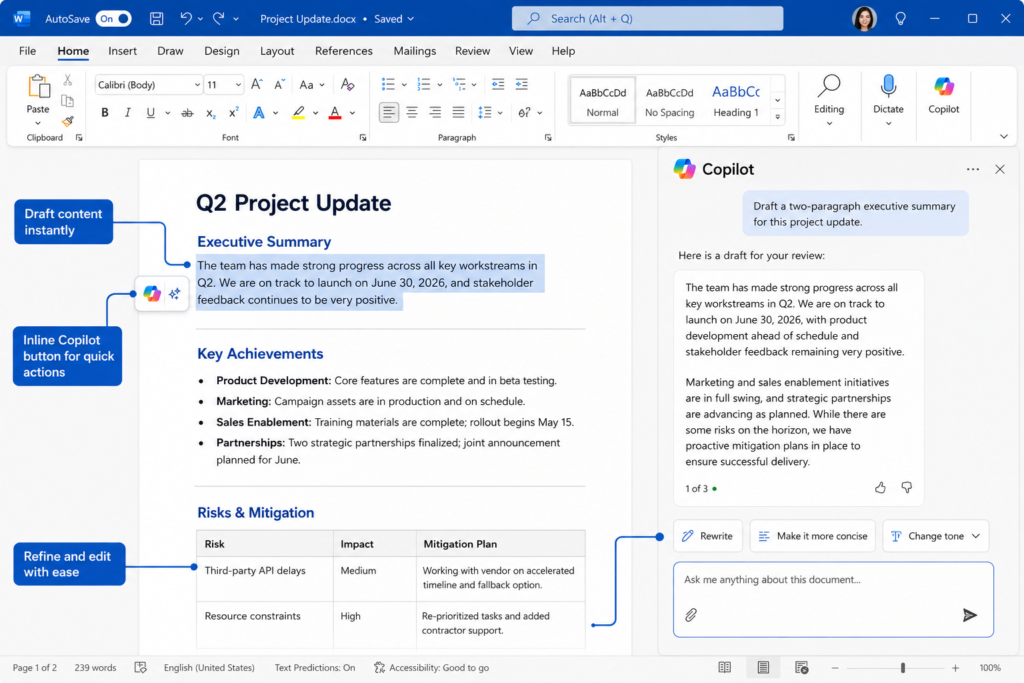
Word is where most people first meet Copilot, and it’s improved noticeably since its early days. You can type a prompt like “draft a two-page project update for our Q2 launch” and Copilot will ask a couple of clarifying questions about tone and audience before producing a full draft. In workplace accounts, it pulls relevant context from recent emails and shared files automatically, which genuinely saves time when you’re writing something that references real project details.
What impressed me most was the newer agentic editing mode, which can handle multi-step revisions — for example, restructuring a document’s outline, updating formatting throughout, and tightening the language, all from a single instruction instead of a back-and-forth chat. That said, it’s not flawless. Long or highly technical documents still need a careful human pass, since Copilot occasionally smooths over nuance or repeats itself across sections.
Copilot in Excel: The Genuine Standout
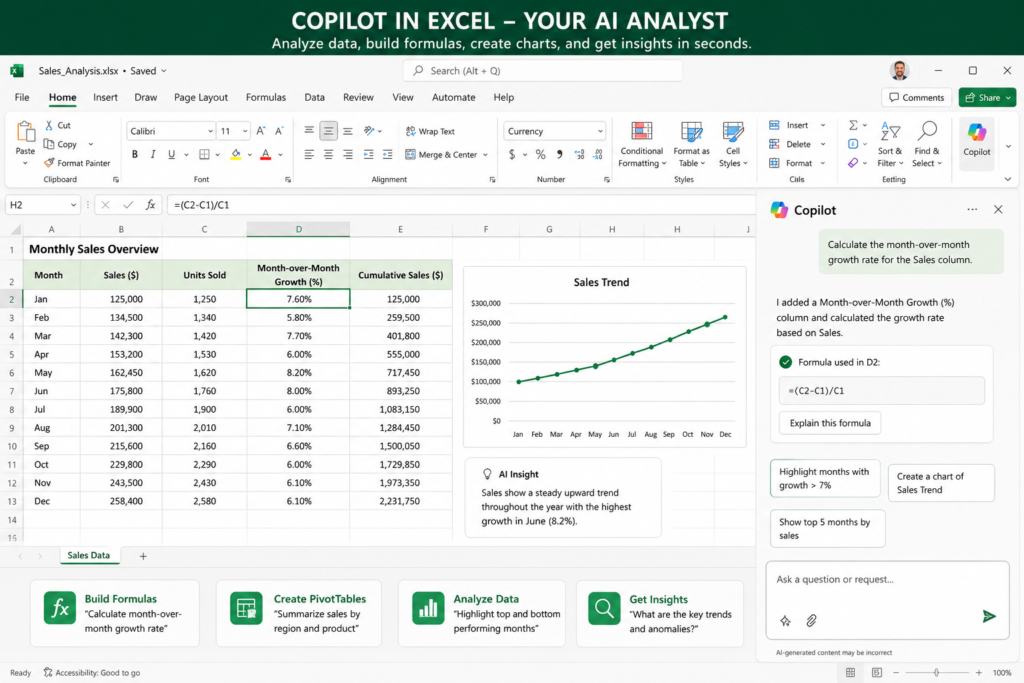
If there’s one app where Copilot feels indispensable, it’s Excel. Ask it to build a formula in plain English — “calculate the month-over-month growth rate for column C” — and it works reliably, even with fairly complex nested logic. It can also generate pivot tables, highlight anomalies in a dataset, and explain what a cryptic formula someone else built three years ago is actually doing.
The newer Agent Mode takes this further, letting Copilot work through a multi-step analysis task on its own: cleaning data, building a summary table, and generating a chart, checking its own work along the way. For anyone who spends real hours in spreadsheets, this alone can be worth the subscription.
Copilot in Outlook and Teams
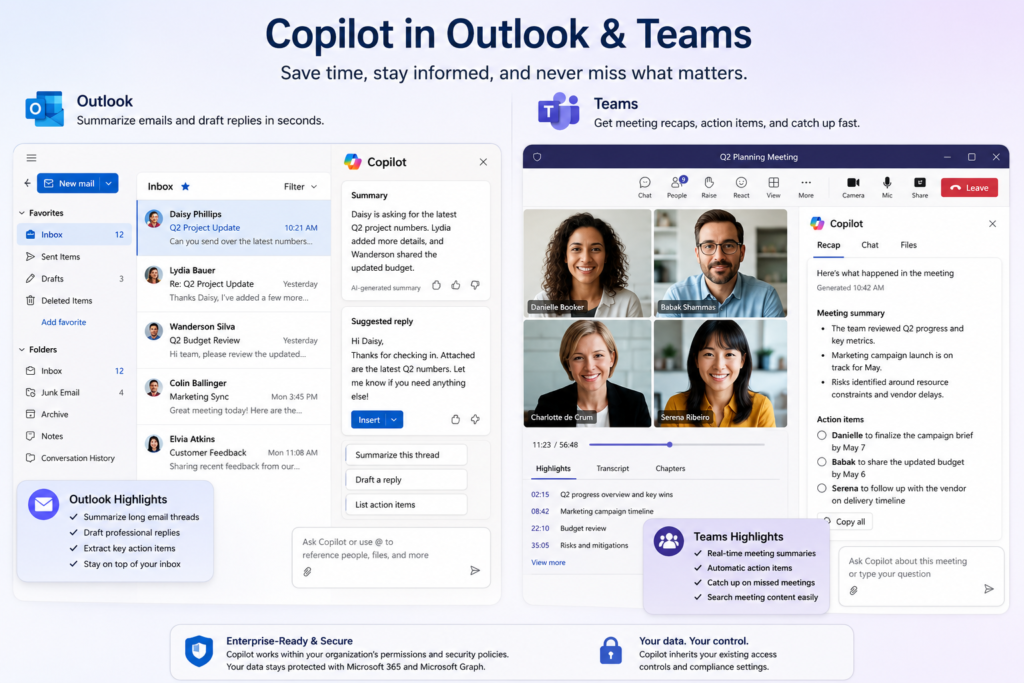
In Outlook, Copilot’s “summarize this thread” and “draft a reply” features are the kind of small conveniences that add up over a workday. Long email chains get condensed into a few bullet points, and drafted replies are usually a solid starting point, even if you’ll want to adjust the tone before hitting send.
Teams is where Copilot shines for anyone who lives in back-to-back meetings. Real-time meeting summaries, automatically generated action items, and the ability to catch up on a call you missed by asking “what did I miss?” are genuinely useful, particularly for hybrid and remote teams across different time zones in the US.
Copilot in PowerPoint: Good, But Not Magic
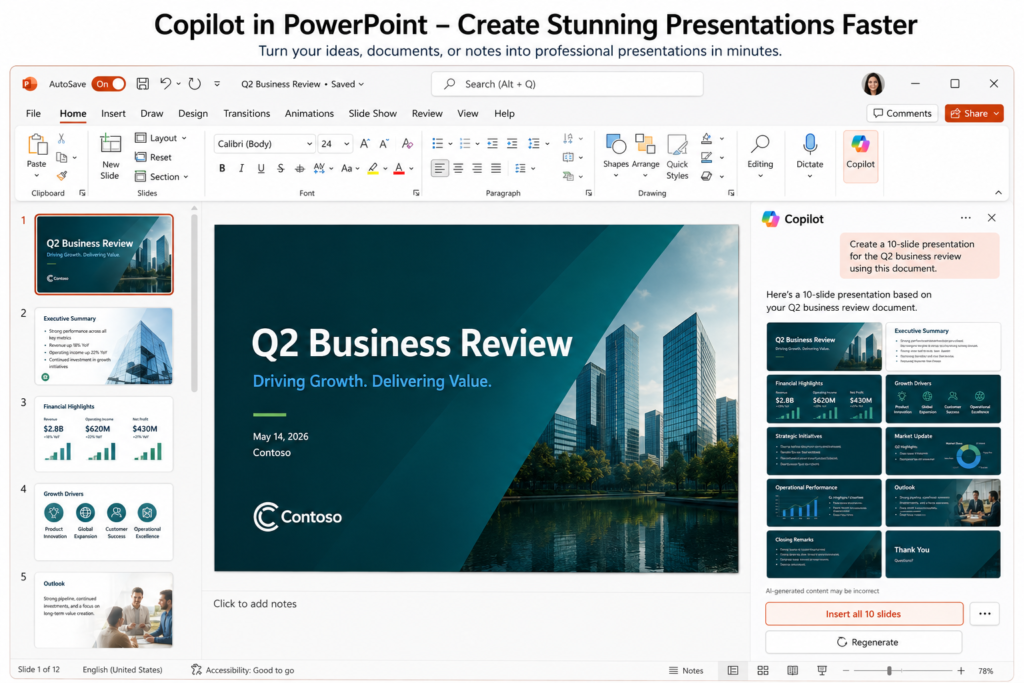
This is where I’d temper expectations. Copilot can generate a full slide deck from a prompt or an existing Word document, and it’s fast — you’ll have a rough draft in a couple of minutes. But the output tends to follow repetitive layouts, and the actual storytelling and visual polish still require significant manual work. Copilot is far better at converting content you’ve already written into slides than at creating a persuasive presentation from scratch. If polished, brand-consistent decks are central to your job, plan on treating Copilot as a first draft generator, not a finished product.
Copilot Memory and Personalization
One of the more meaningful 2026 additions is Copilot Memory, which learns your writing style and preferences over time. In practice, this means fewer generic outputs the longer you use it — Copilot starts matching your typical tone, common phrases, and formatting habits, rather than defaulting to the same bland corporate voice for every user. It’s a small feature, but it noticeably improves the quality of drafts after a few weeks of regular use.
Microsoft Copilot Pricing in 2026 (US Dollars)
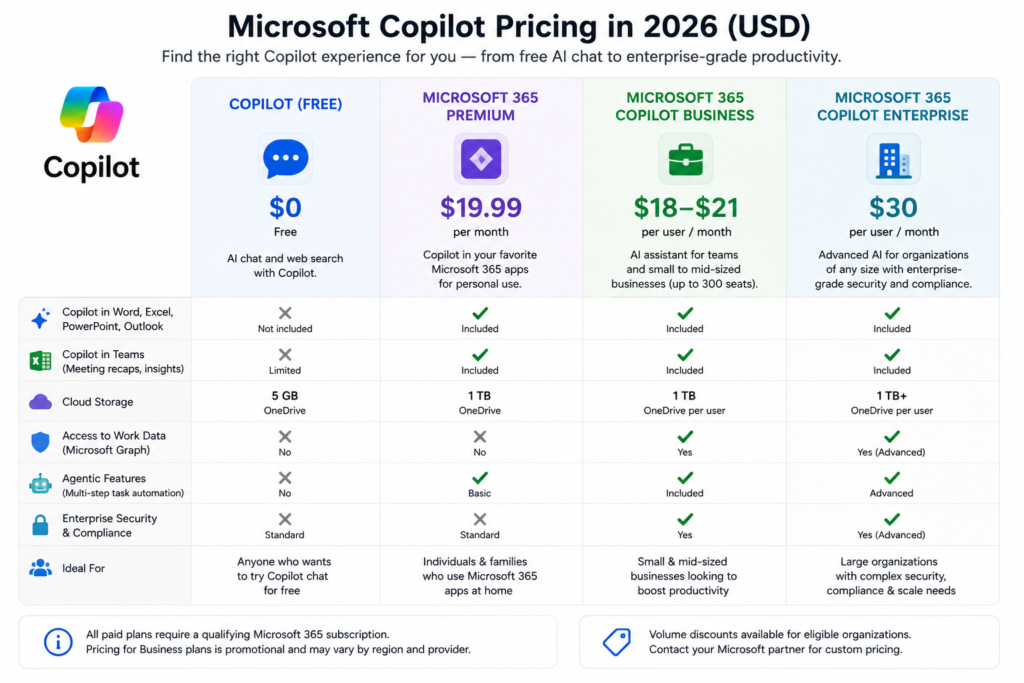
Pricing is genuinely the most confusing part of Copilot, so here’s the breakdown as it stands for US users in 2026:
For individuals and families:
- Copilot (Free) — $0, web chat only, no integration with your personal files.
- Microsoft 365 Premium — around $19.99/month, bundling Copilot with Word, Excel, PowerPoint, Outlook, and expanded OneDrive storage. This is now the recommended plan for most home users, replacing the old $20/month Copilot Pro subscription (which is being phased out through mid-2026).
For businesses:
- Microsoft 365 Copilot Business — priced around $18–$21 per user/month as a promotional rate for organizations up to 300 seats, layered on top of a qualifying Microsoft 365 base plan (Business Basic, Standard, or Premium).
- Microsoft 365 Copilot Enterprise — $30 per user/month on an annual commitment, added to an E3 or E5 license, with no seat cap. Volume discounts are available for larger deployments.
- Bundled small-business plans — some providers now offer Business Standard + Copilot or Business Premium + Copilot as combined SKUs, generally landing between roughly $42 and $52 per user/month all-in.
A few things are worth flagging here. First, Copilot is always an add-on to a Microsoft 365 subscription — you can’t buy the work version standalone. Second, base Microsoft 365 license prices themselves are also rising in 2026, so your total cost per employee is going up even if your Copilot add-on price stays flat. Third, plenty of organizations that pilot Copilot end up with unused licenses sitting on the books; if you’re rolling it out for a team, it’s worth tracking actual usage rather than assuming everyone will adopt it on day one.
Is Microsoft Copilot Worth the Money?
For individuals with a Microsoft 365 subscription who write, analyze data, or sit in a lot of meetings, Microsoft 365 Premium is a reasonable value at roughly $20/month, especially since it also includes storage and app access you’d otherwise pay for separately. Compared to paying for a standalone AI chatbot subscription on top of your existing Office apps, it consolidates costs nicely.
For businesses, the calculation is murkier. Copilot delivers real time savings in specific, high-frequency tasks: summarizing meetings, drafting first-pass emails, cleaning up spreadsheets, and turning documents into rough presentations. Independent research and internal Microsoft case studies point to meaningful productivity gains for heavy users, some reporting close to an hour saved per day on drafting and summarizing work. But those gains aren’t universal. Adoption rates across large organizations remain modest, and a chunk of purchased seats often go underused, particularly when employees aren’t given proper training on how to prompt the tool effectively. If your team is going to actually use it daily, it can pay for itself. If it’s bought as a checkbox feature nobody’s trained on, it becomes an expensive line item.
Microsoft Copilot vs. ChatGPT vs. Google Gemini
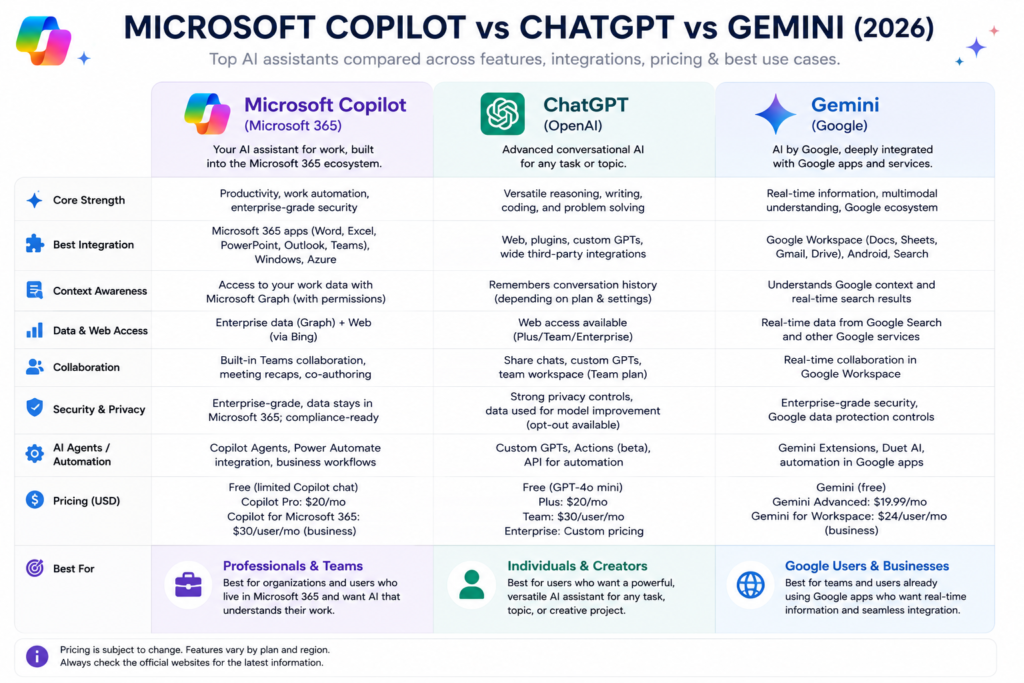
It’s a fair question: why not just use ChatGPT or Gemini instead?
Copilot’s advantage is context. Because it’s grounded in your actual emails, files, and calendar through Microsoft Graph, it can answer questions and draft content that’s specific to your real work, not generic templates. If your organization already lives inside Microsoft 365, that built-in integration is hard to replicate with an outside tool.
ChatGPT’s advantage is raw model capability and flexibility. It tends to have a larger, more active plugin and integration ecosystem, and many users find its conversational reasoning slightly more capable for open-ended tasks like coding or brainstorming outside of Office documents.
Gemini’s advantage shows up if you’re a Google Workspace household or business — deep integration with Gmail, Docs, and Sheets mirrors what Copilot does for Microsoft users, often at a competitive price with generous storage.
The honest takeaway: Copilot isn’t necessarily the “smartest” AI on the market feature-for-feature, but its deep integration into apps hundreds of millions of Americans already use daily is what makes it valuable. It’s less about which model is best and more about which assistant is already sitting where you work.
What Microsoft Copilot Gets Right
- Genuinely useful for repetitive, high-volume tasks like email summaries, meeting recaps, and spreadsheet formulas.
- No new app to learn — it lives inside Word, Excel, Outlook, and Teams.
- Copilot Memory makes outputs feel more personalized the longer you use it.
- Excel’s Agent Mode and multi-step task automation are genuinely strong for data-heavy work.
- Bundled consumer pricing (Microsoft 365 Premium) is competitive against standalone AI subscriptions.
Where Microsoft Copilot Falls Short
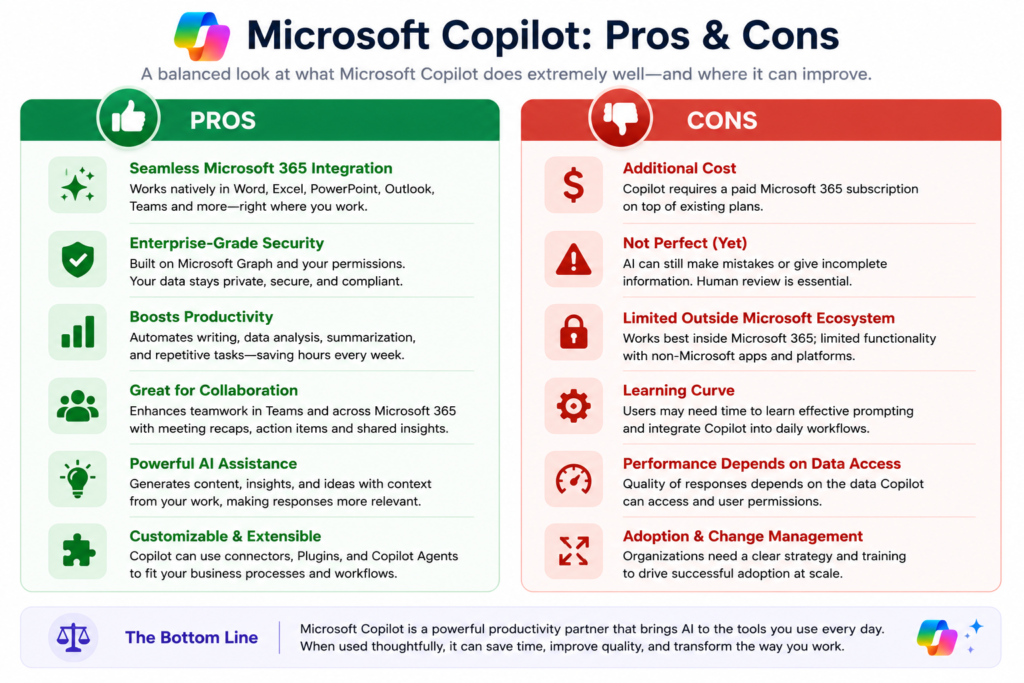
- PowerPoint output still needs significant manual editing for anything client-facing or polished.
- Pricing structure across free, personal, business, and enterprise tiers is confusing and changes frequently.
- Requires an underlying Microsoft 365 subscription — there’s no truly standalone paid option for businesses.
- Real-world adoption inside companies is inconsistent; without training, a lot of paid seats go unused.
- Long, nuanced documents still need careful human review before you can trust the output.
Who Should Use Microsoft Copilot?
Copilot makes the most sense if you already live inside Microsoft 365 for work or personal use and spend real time on writing, spreadsheets, or back-to-back meetings. Remote and hybrid teams juggling Teams calls across time zones tend to see outsized value from the meeting summary features alone. Small business owners handling their own admin work — emails, basic reports, simple financial spreadsheets — will likely find Microsoft 365 Premium pays for itself in saved hours.
It’s a weaker fit if your team’s real work happens outside the Microsoft ecosystem — in Slack, Notion, Google Workspace, or specialized tools Copilot can’t see. In that case, the deep integration that makes Copilot valuable simply doesn’t apply to your daily workflow, and a general-purpose AI assistant might serve you better.
Final Verdict
Microsoft Copilot in 2026 is a genuinely useful, occasionally impressive assistant that earns its place for people already committed to the Microsoft ecosystem. It’s not going to write your novel or replace a skilled analyst, and it’s certainly not going to hand you a boardroom-ready slide deck without edits. But for the unglamorous daily grind — summarizing a 40-slide contract, catching up on a missed meeting, cleaning a messy spreadsheet, or getting a first draft of an email out the door — it consistently saves time.
If you’re already paying for Microsoft 365, upgrading to a Copilot-enabled tier is worth trying, especially with current promotional pricing. If you’re evaluating it fresh against ChatGPT or Gemini, the deciding factor should be less “which AI is smarter” and more “where does my actual work already live.” For most American households and small businesses running on Word, Excel, and Outlook, that answer points squarely at Microsoft’s own back yard.
Frequently Asked Questions
Is Microsoft Copilot free to use? There’s a free version of Copilot available through Windows, Edge, and the Copilot app, but it’s limited to general web-grounded chat and doesn’t connect to your personal files, emails, or Office documents. Full integration requires a paid Microsoft 365 plan.
How much does Microsoft Copilot cost per month? For individuals, Microsoft 365 Premium runs around $19.99/month and includes Copilot across Word, Excel, PowerPoint, and Outlook. For businesses, Copilot typically adds $18 to $30 per user per month on top of an existing Microsoft 365 Business or Enterprise subscription, depending on plan and promotional pricing.
Is Microsoft Copilot Pro still available? Microsoft has been phasing out the standalone $20/month Copilot Pro plan since late 2025 in favor of Microsoft 365 Premium, which bundles the same AI features with the full Office suite and more cloud storage. Existing Copilot Pro subscribers can continue using it until support ends, but new sign-ups should look at Microsoft 365 Premium instead.
Does Microsoft Copilot work without a Microsoft 365 subscription? The free version works independently, but any deep integration with Word, Excel, Outlook, or your organization’s data requires an eligible Microsoft 365 subscription. There’s no way to buy the full-featured business version as a standalone product.
Is Microsoft Copilot better than ChatGPT? It depends on your use case. Copilot’s strength is its deep integration with Microsoft 365 apps and your actual work data, making it more useful for office tasks. ChatGPT often edges ahead in raw conversational flexibility and general-purpose reasoning outside of Office documents. Many users end up keeping both.
Can Microsoft Copilot see my private emails and files? In a work or personal Microsoft 365 account with Copilot enabled, it can access your emails, documents, and calendar to provide contextual answers, but it operates within your organization’s existing permissions and security settings. The free version of Copilot does not have this access.
Is Microsoft Copilot safe for business and confidential data? Microsoft designs the business and enterprise tiers to respect your organization’s existing data permissions, compliance settings, and security policies through Microsoft Graph. That said, any organization handling sensitive data should review its own IT and compliance policies before rolling out AI tools broadly.
Does Copilot work in PowerPoint as well as Word and Excel? Yes, but with caveats. Copilot can generate a first-draft slide deck from a prompt or document quickly, but the layouts tend to be generic and usually need manual polishing for anything client-facing. It performs noticeably better converting existing written content into slides than building an original presentation from scratch.
How does Copilot Memory work? Copilot Memory is a 2026 feature that learns your writing style, tone, and preferences over repeated use, gradually producing drafts and suggestions that feel more personalized rather than generic. It improves noticeably with a few weeks of regular use.
Is Microsoft Copilot worth it for small businesses? For small businesses already using Microsoft 365 for email, documents, and spreadsheets, Copilot can genuinely save time on routine admin work like drafting emails, summarizing documents, and building spreadsheets. The value depends heavily on whether the team actually adopts and uses it daily, so trying a smaller pilot before rolling it out company-wide is a sensible approach.
Read Also ……

Hey, I’m Manish
I’ve tested 100+ AI tools since 2023 and reviewed them honestly on ZentroAI.
My mission: Help you discover the best AI tools without the hype.
Whether you need ChatGPT alternatives, coding assistants, or image generators .
you’ll find detailed, hands-on reviews here.